An SVG pattern is a reusable graphical definition that tiles its contained geometry across an SVG element’s filled region. Store it inside the SVG’s <defs>, give it a unique ID, and apply it with a URL fill. section 10.2.2
Build a pattern progressively:
- Append <defs> to the SVG, then append <pattern> with a unique ID, width, height, and patternUnits="userSpaceOnUse". section 10.2.2
- Add SVG shapes inside the pattern to form one tile, such as a background rectangle and a line, circle, or polygon. section 10.2.2
- Apply the tile with fill="url(#pattern-id)"; use patternTransform to translate or rotate repeated geometry. section 10.2.2
Encoding conservation status
A D3 scatterplot can combine categorical colors with patterns: circles use dots, horizontal lines, vertical lines, stars, or crosses according to conservation status. A getPattern function returns the matching URL, and the same fills can appear in the legend. section 10.2.2
Figure 10.11 To create a pattern consisting of horizontal lines, we can make a tile with a white square and a horizontal SVG line. This tile will be repeated horizontally and vertically, creating the desired pattern.
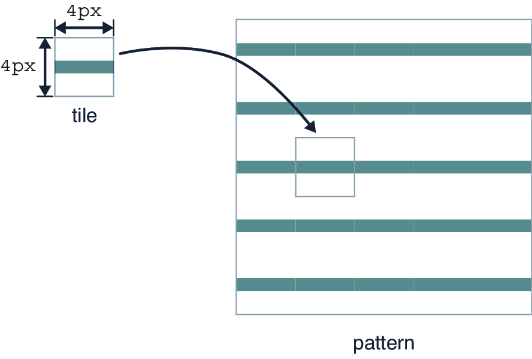
A white square containing a horizontal line becomes a tile repeated horizontally and vertically, producing a striped fill. section 10.2.2
