liveBook · Manning

System-assigned managed identity

As explained in Azure Security

A system-assigned managed identity is a managed identity whose lifecycle is tied to a single Azure resource.

A system-assigned managed identity gives one Azure resource an identity for accessing Azure services that support Azure AD authentication, without storing passwords, certificates, or service-principal secrets. Its lifecycle is tied to that single resource. section 2.1.5

Use this identity type when:

  • An Azure resource such as an App Service or virtual machine must call an Azure service using Azure AD authentication. section 2.1.5
  • The identity should belong to one resource rather than be shared across multiple resources. section 2.1.5
  • You are installing Azure Monitor Agent (AMA) on a small or individually managed VM set; at larger scale, separate identities for every VM can create unnecessary identity sprawl. section 9.1.4

Installing AMA with a system-assigned identity

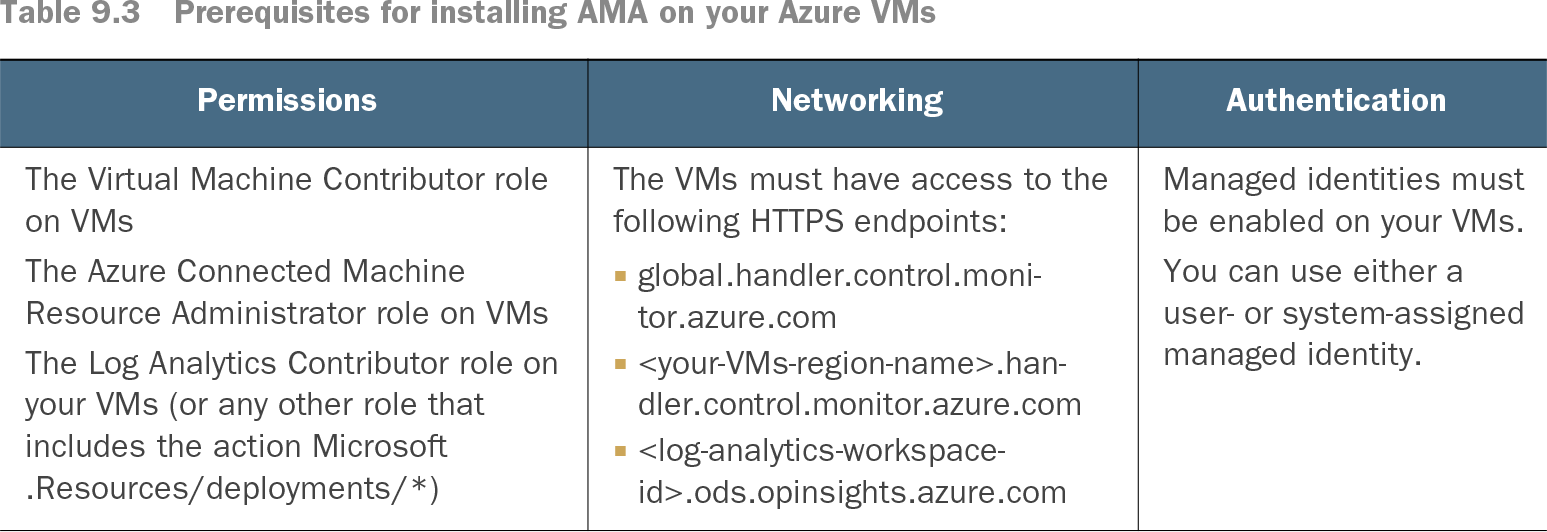
To install AMA on an Azure VM with a system-assigned managed identity, enable the identity on the VM and omit the settings line used to identify a user-assigned identity. The VM must also meet the required permissions and networking prerequisites. section 9.1.4

Table 9.3 Prerequisites for installing AMA on your Azure VMs (view table figure)

Permissions

Networking

Authentication

The Virtual Machine Contributor role on VMs

The Azure Connected Machine Resource Administrator role on VMs

The Log Analytics Contributor role on your VMs (or any other role that includes the action Microsoft .Resources/deployments/*)

The VMs must have access to the following HTTPS endpoints:

  • global.handler.control.monitor.azure.com
  • <your-VMs-region-name>.handler.control.monitor.azure.com
  • <log-analytics-workspace-id>.ods.opinsights.azure.com

Managed identities must be enabled on your VMs.

You can use either a user- or system-assigned managed identity.

Use the prerequisite table to check permissions, HTTPS endpoint access, and managed-identity requirements before installing AMA. section 9.1.4

How Azure Security covers it

How deep it goes
Defines resource binding and contrasts identity types, then applies the choice to Azure Monitor Agent deployment and scale.
Examples
Uses Azure virtual machines installing Azure Monitor Agent, including a 100-VM identity-scaling scenario.
What it assumes
Assumes Azure resource and Azure AD familiarity while requiring enabled identities, specified permissions, and required HTTPS endpoint access for AMA.
What you can do after
Operate Azure Monitor Agent on a VM using a system-assigned identity and verify its deployment prerequisites.
How it connects
Connects managed identities with Azure AD authentication, service principals, Azure virtual machines, Azure App Services, and Azure Monitor Agent.

Related concepts

This explainer was generated by Manning's knowledge graph from the text of Azure Security. The section links point to the parts of the book it draws on.