System.Web.dll is the .NET Framework assembly that provides the core infrastructure for classic ASP.NET web applications, including ASP.NET Web Forms and ASP.NET MVC. It is preinstalled with Windows and supplies the framework code used to build these applications. section 2.2
Its long production history makes it dependable, but its architecture also sets important boundaries:
- Supports a mature, battle-tested ASP.NET platform with extensive features and familiarity among Windows web developers. section 2.2
- Binds classic ASP.NET to .NET Framework and the Windows-based Internet Information Services (IIS) host. section 2.2
- Limits platform evolution because changes to the shared assembly are far-reaching and slow to release. section 2.2
- Receives no new features or updates now that .NET Framework is considered complete. section 2.2
ASP.NET Web Forms is especially dependent on this assembly and IIS, so moving it directly to ASP.NET Core is effectively a rewrite rather than a framework switch. A gradual path may use Blazor Server for page-by-page migration or introduce web API concepts while reducing reliance on constructs such as ViewState. section 2.4.3
Evaluating a legacy Web Forms application
A Windows-hosted Web Forms application can continue using its established System.Web.dll infrastructure, but a move to ASP.NET Core requires weighing the rewrite effort against cross-platform deployment, modular features, and performance goals. Blazor Server or incremental web API adoption may provide intermediate migration steps. section 2.4.3 section 2.2
Figure 2.2 The relationships among ASP.NET Core, ASP.NET, .NET Core/.NET 5+, and .NET Framework. ASP.NET Core runs on .NET Core and .NET 5+, so it can run cross-platform. Conversely, ASP.NET runs on .NET Framework only, so it’s tied to the Windows OS.
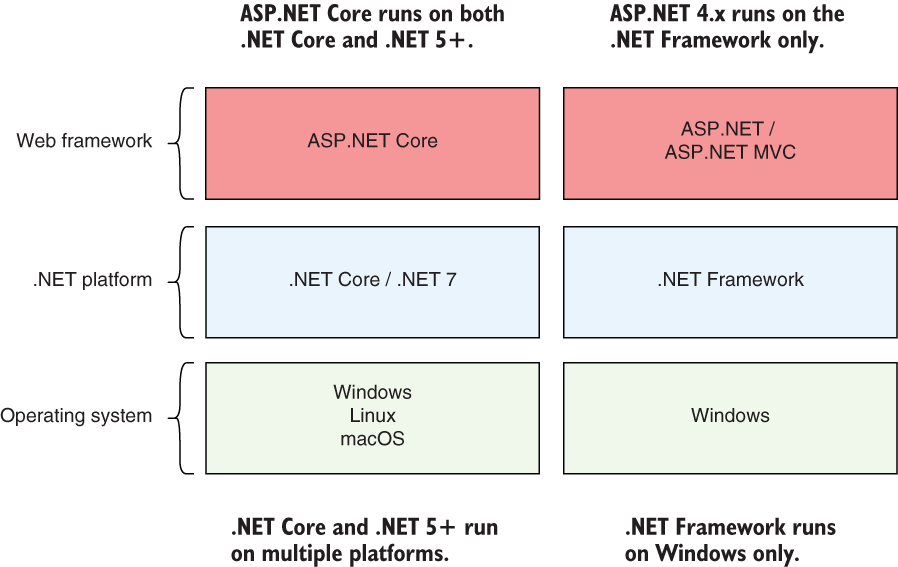
Use the relationship diagram to distinguish classic ASP.NET on .NET Framework from ASP.NET Core on .NET Core and .NET 5+. section 2.2
