A credit model may keep receiving similar-looking applications while the proportion of borrowers who default changes. Target drift is a change in the distribution of the outcome being predicted. For a binary default target, the practical check is whether the share of records with target = 1 differs between reference and current data. A higher default rate may signal a riskier population and prompt review of the model’s decisions. section 6.2.2 section 6.2
Check target drift alongside feature drift:
- Prepare reference and current DataFrames with both features and observed target values; identify the target column in Evidently’s ColumnMapping. section 6.2.1
- Run a Report with TargetDriftPreset for the default-rate comparison and DataDriftPreset for feature distributions, then save the HTML report for review. section 6.2.1
- Inspect the target panel’s reference and current rates and Jensen–Shannon divergence (JSD) score. Keep this distinct from per-feature drift scores and their thresholds. section 6.2.2
Listing 6.9 Creating and saving the Evidently drift report
from evidently import ColumnMapping
from evidently.report import Report
from evidently.metric_preset import DataDriftPreset, TargetDriftPreset

df_train = X_train.copy()    #1
df_train["target"] = y_train.values

df_test = X_test.copy()    #2
df_test["target"] = y_test.values

col_map = ColumnMapping(    #3
    target="target",
    numerical_features=X_train.select_dtypes(include="number").columns.tolist(),
    categorical_features=X_train.select_dtypes(exclude="number").columns.tolist()
)

combined_report = Report(     #4
    metrics=[
        DataDriftPreset(),
        TargetDriftPreset()
    ]
)

combined_report.run(      #5
    reference_data=df_train,
    current_data=df_test,
    column_mapping=col_map
)

combined_report.save_html("combined_drift_report.html")    #6
print("Drift report saved to 'combined_drift_report.html'")
The Python listing assembles both datasets, maps the target and feature types, runs the combined Evidently report, and saves it as HTML. section 6.2.1
Reading a change in default rate
Nearly identical reference and current default rates can produce a JSD near zero, such as 0.0006, with no target drift detected. A rise from 26% to 31% instead suggests a riskier population; investigate whether retraining or recalibrating decision thresholds is warranted. Do not treat feature drift alone as proof that the default rate changed: features can be flagged while the target remains stable. section 6.2.2
Figure 6.11 Target drift panel in Evidently. The bar chart displays the default = 0 and default = 1 rates in the reference set versus the current set. Here, “no drift detected” indicates minimal changes in the proportion of defaults.
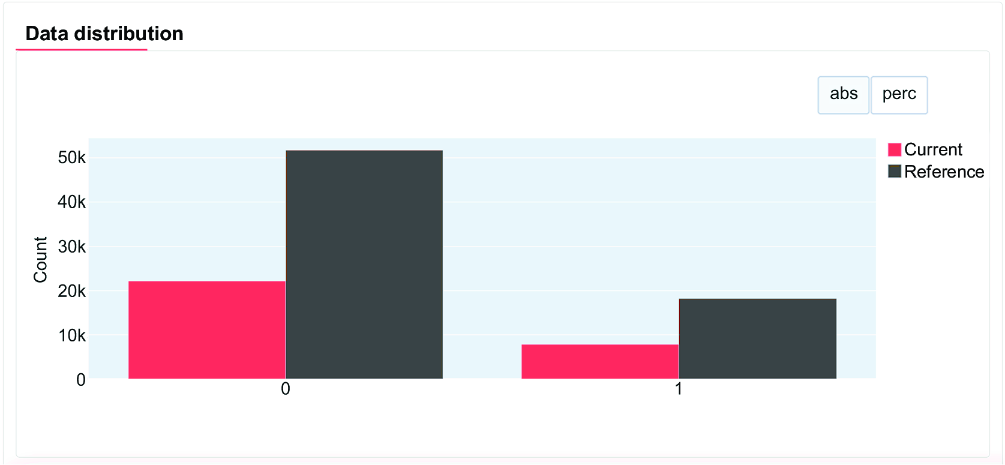
The target panel compares the proportions of default = 0 and default = 1 in reference and current data; its example shows minimal change. section 6.2.2
Keep dated HTML reports for periodic risk and compliance review. If drift is severe and sustained, a challenger model can be evaluated alongside the current model rather than treating a dashboard alert as an automatic replacement decision. section 6.2.2
