The TCP/IP protocol suite is the layered framework used by modern networks to organize the functions and protocols required for communication. It provides a practical map from an application’s data to the physical medium carrying bits between devices. section 4.0 section 4.3
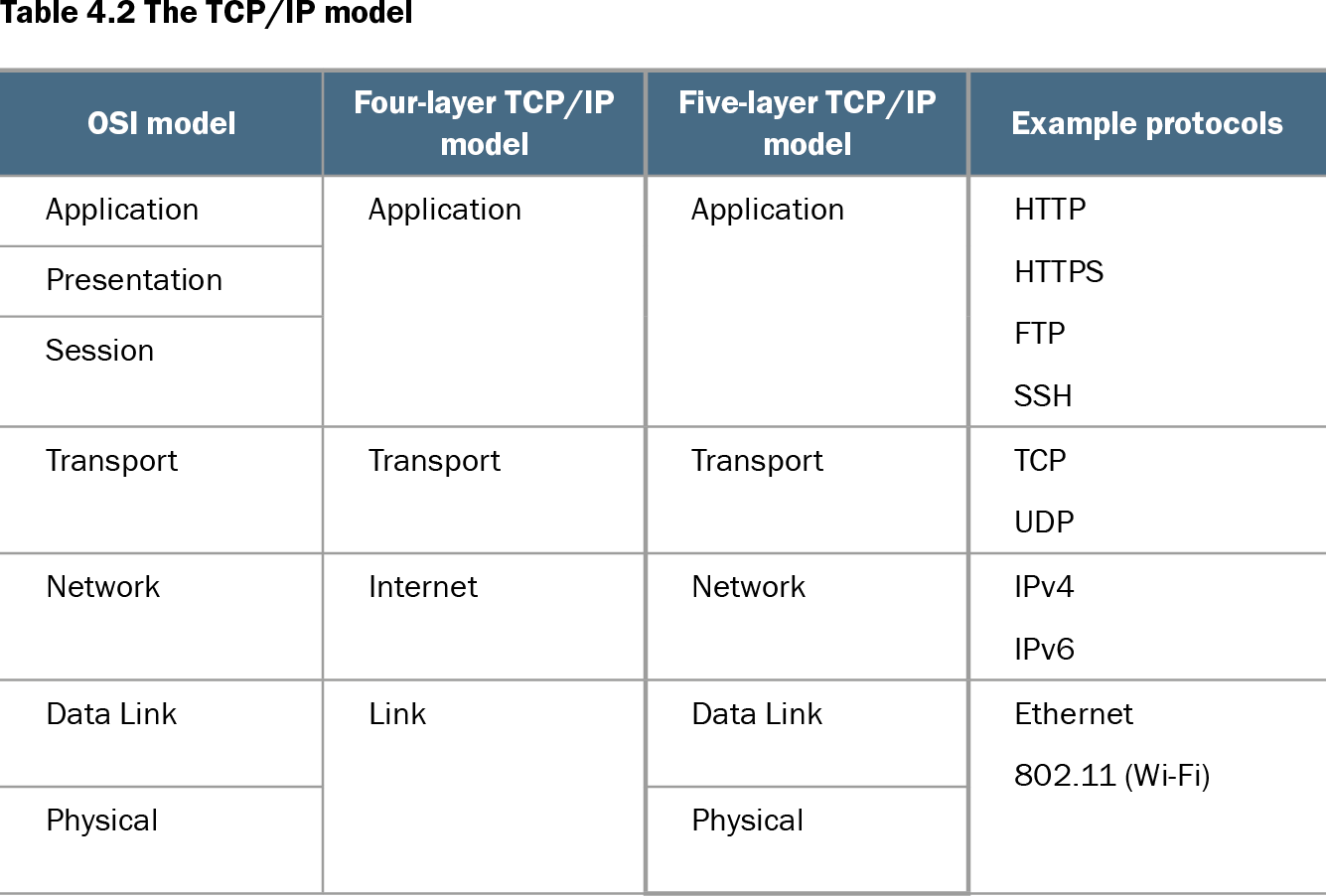
Table 4.2 The TCP/IP model (view table figure)
| OSI model |
|||
|---|---|---|---|
| Application |
Application |
Application |
HTTP HTTPS FTP SSH |
| Presentation |
|||
| Session |
|||
| Transport |
Transport |
Transport |
TCP UDP |
| Network |
Internet |
Network |
IPv4 IPv6 |
| Data Link |
Link |
Data Link |
Ethernet 802.11 (Wi-Fi) |
| Physical |
Physical |
Use the layer comparison to connect each TCP/IP layer with its OSI counterpart and representative protocols. section 4.3
The commonly used TCP/IP model has five layers:
- Physical Layer: carries bits as electrical signals, light, or radio waves through media such as copper, fiber, and Wi-Fi. section 4.3.1
- Data Link Layer: provides hop-to-hop delivery and addresses each frame to the next device with a MAC address; switches forward frames but do not create hops. section 4.3.1
- Network Layer: provides end-to-end delivery using IP addresses. The destination IP remains constant, while the destination MAC address changes at every hop. section 4.3.1 section 4.4
- Transport Layer: delivers messages to the correct application through port numbers; TCP and UDP are example protocols. section 4.3.1 section 4.4
- Application Layer: interfaces applications with network services through protocols such as HTTP, HTTPS, FTP, and SSH. section 4.3 section 4.3.2
Communication proceeds through encapsulation. The application prepares data; the Transport Layer adds a port-based header; the Network Layer adds an IP header; and the Data Link Layer adds a header and error-checking trailer before transmission as bits. At the destination, de-encapsulation removes these additions in reverse order. The resulting protocol data units are a segment, packet, and frame. section 4.3.2
Requesting a web page across routers
A browser on PC1 uses HTTPS to request a page from SRV1. Transport addresses port 443, Network addresses SRV1’s IP address, and Data Link addresses the next hop’s MAC address. At every router hop, a new frame is created with a new MAC destination, while the destination IP remains unchanged. section 4.3.1 section 10.0
Figure 10.1 A summary of actions taken by each device when PC1 sends a packet to PC3. PC1 prepares a packet addressed to PC3, uses ARP to learn the default gateway’s MAC address (R1 G0/1), and sends the packet in a frame to that MAC address. The switches learn the MAC addresses of connected devices and forward/flood frames as appropriate. The routers select the best route to forward the packet, use ARP to learn the next hop’s MAC address, and forward the packet in a frame addressed to that MAC address.
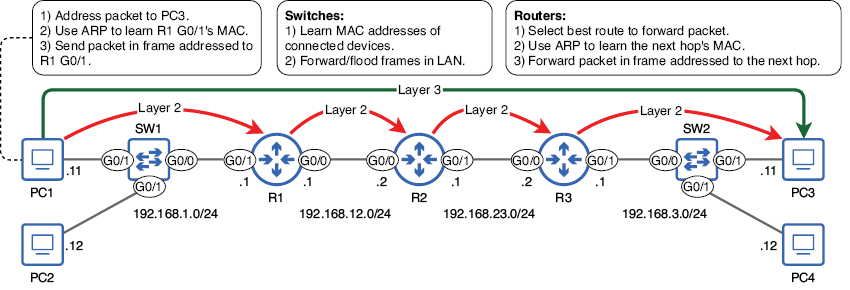
Trace a complete packet journey involving ARP, switching, routing, default-gateway addressing, and frame replacement at each hop. section 10.0