Temperature is the randomness dial for language-model generation. Lower values make responses more focused and conservative; higher values make them more varied, creative, and unpredictable. The commonly described range is 0 to 2, with 1 as the default. section 2.7
Use temperature to match an output to its job. A hotel chatbot might need a restrained answer for a reliable recommendation, but a storytelling prompt can benefit from extra creative wiggle room. Temperature changes the model’s generation preferences alongside controls such as frequency penalties, presence penalties, and Top P. section 2.5 section 6.8
One restaurant question, two moods
For “Can you suggest a good restaurant nearby?”, a high setting such as 1.3 produces an imaginative answer with varied food options and an adventurous tone. A lower setting such as 0.2 gives a more focused recommendation, such as a specific Italian restaurant. Neither setting magically guarantees accuracy, so verify factual recommendations. section 2.7
Figure 2.6 Upper selection of tools in the Playground UI
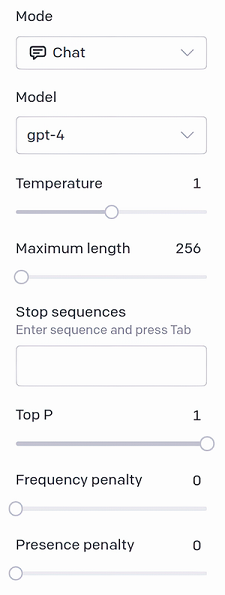
Use the Playground controls to see temperature alongside other completion settings before transferring a configuration into programmatic API code. section 2.14 section 2.5
















