TensorBoard provides detailed, asynchronous visibility into model training: monitor metrics in real time, debug model behavior, compare runs, and inspect model architecture. It complements MLflow, which handles higher-level experiment tracking, lineage, and artifact storage. section 9.2 section 9.4
Deploy TensorBoard against logs produced by a training pipeline:
- Run the pipeline and wait for the create-PVC operation to complete. section 9.2.1
- Identify the PVC name attached to the training component, where production training logs are saved. section 9.2.1
- In Kubeflow, create a TensorBoard, select the PVC and its name, then connect after the instance reports success. section 9.2.1
Inspecting a YOLOv8 training run
YOLOv8 writes consumable logs into the project directory. TensorBoard can display default mean Average Precision graphs, helping operators monitor accuracy across epochs, identify fit problems or early-stop opportunities, and adjust hyperparameters, data, or architecture. Its architecture view exposes the flow of data through the model’s layers and connections. section 9.2 section 9.2.2
Figure 9.9 A selection of graphs made available by the YOLOv8 library
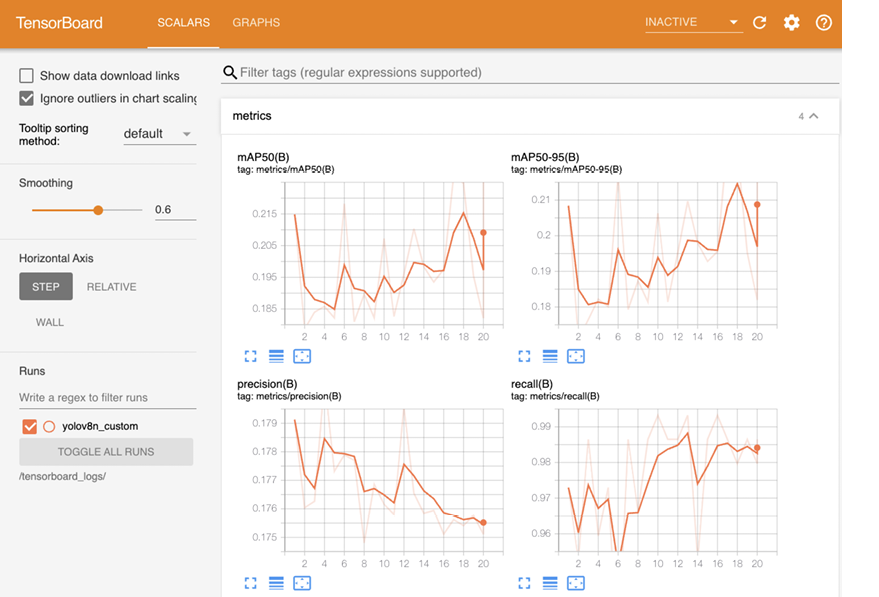
Browse representative YOLOv8 graphs to connect training metrics with performance monitoring and optimization decisions. section 9.2.2

