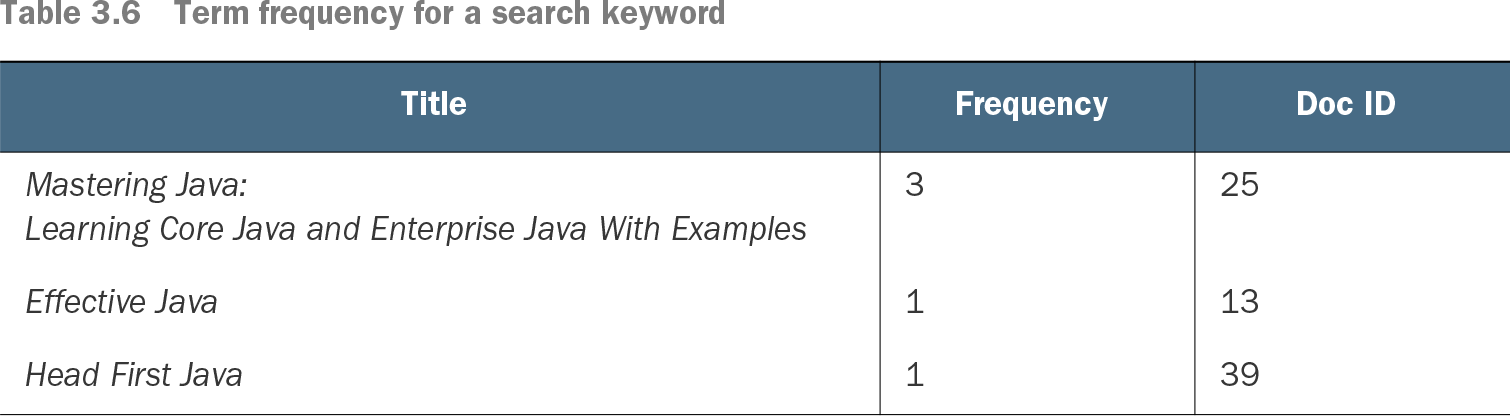
Term frequency (TF) counts how many times a search term appears in a document or field. In Elasticsearch relevance scoring, that count is one signal for deciding which matching documents should rank higher. A title containing “Java” three times has a higher raw term frequency than titles containing it once. section 3.4.2 section 3.4.1
Count a term in search results
For a search on “Java,” “Mastering Java: Learning Core Java and Enterprise Java With Examples” has frequency 3, while “Effective Java” and “Head First Java” each have frequency 1. Higher frequency can increase relevance, but it is not the only signal: field length and how common the term is across the index also matter. section 3.4.2 section 3.4.2
Table 3.6 Term frequency for a search keyword (view table figure)
| Learning Core Java and Enterprise Java With Examples |
||
Compare the same keyword across book titles to see term frequency as a simple per-document count. section 3.4.2
TF-IDF combines term frequency with inverse document frequency (IDF). The idea is practical: a term that occurs often in one document but is rare across the collection is a stronger relevance signal than a common term. Raw TF-IDF can favor long documents because they have more opportunities to repeat a word. section 3.4.2 section 3.4.2
BM25 is Elasticsearch’s default similarity algorithm and improves on TF-IDF in two ways. It makes term-frequency gains nonlinear, so repeating a term does not raise a score without limit, and it normalizes for document length. This helps prevent long fields from receiving undue credit merely because they contain more words. section 3.4.2 section 3.4.2
Inspect TF in a score explanation
Use the explain flag on a match query when a result’s score needs investigation. Elasticsearch returns scoring details, including TF, IDF, and boost-related calculations. The details let you check how the engine measured the matching term rather than guessing why one document ranked above another. section 8.8.3 section 8.8.3
Run this movie-title match query with explain enabled to inspect the components behind each returned relevance score. section 8.8.3
For one known document, the _explain API can report why it matched or did not match a query and include its scoring calculation. A query for “Lords” instead of “Lord,” for example, can produce no match. Use this when checking both unexpected rankings and missing results. section 8.8.3 section 8.8.3
Similarity is configured per field through mapping APIs. Elasticsearch provides several built-in algorithms and permits custom similarity choices, but custom algorithms are an advanced concern. Start by checking the field being searched: the same term can be more meaningful in a short title than in a long synopsis. section 3.4.2 section 3.4.2