Test-Path tests whether a filesystem or registry path exists and returns a Boolean result. Use it as a guard before an operation that would fail, overwrite something, or produce misleading error handling. In reusable automation, the test belongs in explicit decision logic: act when a required path is missing, or take an alternate path when an item already exists. section 2.1.1 section 6.2.5
A missing path is not always an exceptional condition. For example, a registry key may be absent because a configuration has not been created yet. Test the path first, then retrieve the item only when its container exists. This avoids treating every missing key as an error while preserving try/catch for failures such as denied access. section 6.2.5
Use Test-Path to make automation safe to rerun:
- Create an archive directory when its destination path does not exist, then continue building the dated archive filename. section 2.1.1
- Detect an existing archive file and branch to logic that ensures each run receives a unique filename. section 2.1.1
- Verify a registry key path before enumerating subkeys and reading a required property. section 6.2.5
- Create a virtual hard disk only when its VHD path is absent; separately check whether an existing VHD is attached. section 10.8.1
Guarding VHD creation
When adding a second virtual hard disk, first build the expected VHD path. Test-Path determines whether creation is needed; only a missing path leads to New-VHD. Existence alone does not establish that the disk is attached, so inspect the virtual machine’s hard-drive collection before adding the attachment. Separating those checks keeps restart logic simple and prevents duplicate-create or duplicate-attach errors. section 10.8.1
Figure 2.3 The automation process to ensure that you have a unique file name for the archive file each time the file cleanup automation runs
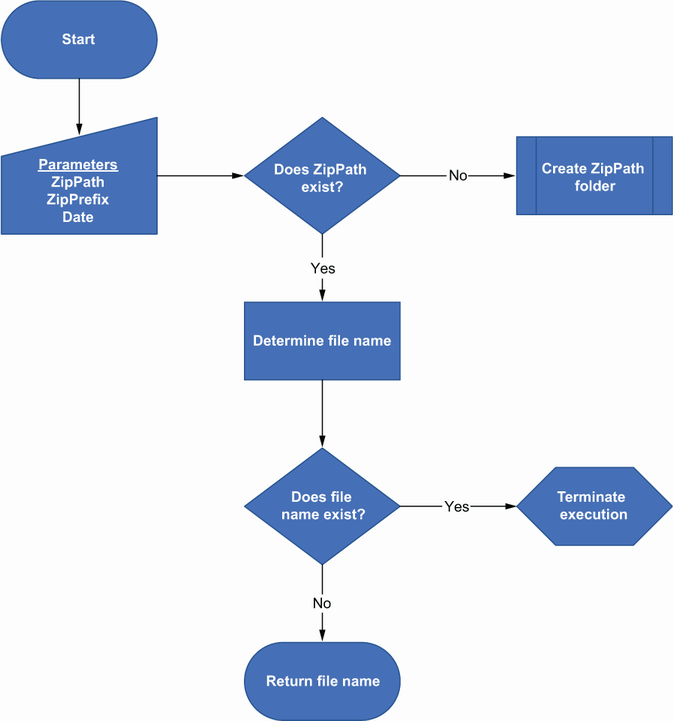
This workflow shows Test-Path as the first branch in archive preparation: create a missing folder, then detect filename collisions before producing an archive. section 2.1.1
