A caption is the text paired with a training image: part label, part ideal prompt. During image-model fine-tuning, it tells the model what it should learn from that image. A great photo with a vague caption is like labeling every drawer in a workshop “stuff.” Technically true; not very helpful. section 13.2.2 section 13.6
Write captions that identify the intended subject and describe the rest of the scene. If every image of a dog says only “A photo of Keats the dog,” the model may treat chairs, bars, or other recurring background details as part of that dog. “A photo of Keats the dog in a bar” gives it a known setting to separate from the subject. section 13.2.3
For a subject-specific LoRA, make captions do a few useful jobs:
- Put the chosen trigger phrase in every caption so the model consistently associates it with the subject. section 13.2.3
- Choose a trigger phrase that reflects the subject without colliding with a meaning the model may already know. section 13.2.3 section 13.6
- Add meaningful scene details rather than stopping at the trigger phrase. section 13.2.3
- Take the slow part seriously: careful captions can matter more than clever model adjustments. section 13.2.3 section 13.6
From bare label to useful caption
Instead of “A photo of Keats the dog,” use “A photo of Keats the dog in a bar.” The second caption preserves the trigger phrase while naming a setting the model already recognizes, helping distinguish the dog from the surroundings. section 13.2.3
Captions can live beside images in several ways: a metadata JSON file, the image filename, or a same-named text file. A per-image .txt file is a practical option when captions need to be longer, and it also makes adding images manually straightforward. section 15.2.3
Figure 15.5 Each label/caption for the image is stored in a similarly named .txt file
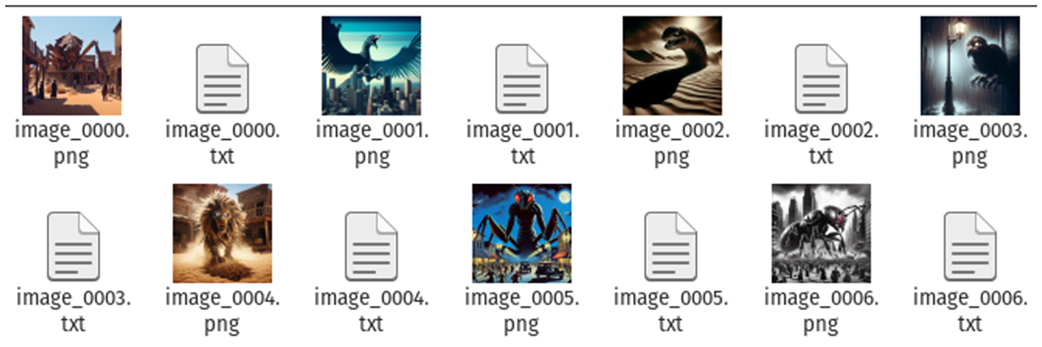
A training folder can pair each image with a similarly named .txt file containing its caption, making the image-to-prompt relationship easy to inspect. section 15.2.3
Before spending time training, check that every image has a caption and scan caption lengths for surprises. In OneTrainer, concept statistics can expose mismatched image and caption counts or unusually short and long captions before bad data wastes a run. section 15.3.4



