A thumbnail is a separate image file with reduced dimensions that previews a larger image. On image-heavy pages, thumbnails let visitors load a smaller initial set of files, then select an image when they want to see it larger. section 10.2.3 section 10.9
Use a thumbnail file rather than merely displaying the full-size file at a smaller size. Full-size photos can be several megabytes each, so a gallery with many originals can demand too much data, especially on slow connections or limited mobile plans. section 10.2.3 section 10.9
A practical thumbnail workflow is:
- Make a copy of each original photo, preserving the original for the large view. section 10.2.3
- Resize the copy to dimensions that suit the gallery. There is no fixed size: galleries with dozens of images may use 50- or 75-pixel widths, while about 300 pixels works for a nine-image gallery. section 10.2.3
- Give the copy a recognizable filename, such as image01-thumbnail.jpg for the original image01.jpg. section 10.2.3
- Place the thumbnail in the gallery and arrange for a click to show the corresponding large-size image temporarily. section 10.2.3
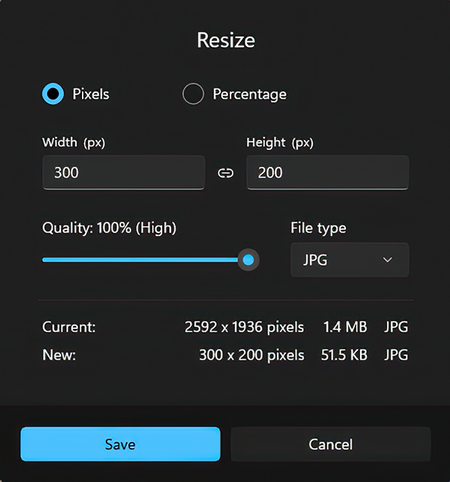
The Resize dialog illustrates the point where a copied original becomes a reduced-dimension thumbnail file. section 10.2.3
In HTML, insert the thumbnail with an img element. Its src attribute identifies the thumbnail file, and its alt attribute supplies a short image description for people using screen readers or Braille apps. Wrap the image in figure and add figcaption when the gallery needs a visible caption. section 10.9 section 10.9
Nine-photo gallery
A gallery can present nine thumbnail images with instructions such as “Click each thumbnail to see the full version of the image.” Each click opens a lightbox-style overlay containing the larger photo; clicking elsewhere returns the visitor to the gallery. The header, gallery, and overlay can be Flexbox containers. section 10.6 section 10.1 section 10.9
I want to build a web page for a photo gallery. I don't know how to code, so I need you to provide the code for me.

First, write the HTML code for a web page that includes the following:
 * A header element that includes an image named logo.png, which is stored in the "images" subdirectory, and the title "Ampersand Photography".
 * A main section with the heading "Photo Gallery".
 * A paragraph with the text "Click each thumbnail to see the full version of the image. To return to the gallery, click anywhere on the page."
 * A gallery element that contains the following images, each of which is stored in the "images" subdirectory, and with each image rendered as a figure with the specified alt text and caption:
  * An image named "image01-thumbnail.jpg" with the alt text "Macro photograph of a cactus" and the caption "Cactus close-up".
  * An image named "image02-thumbnail.jpg" with the alt text "A blurry reflection of a passing streetcar and a person walking" and the caption "Street(car) scene".
  * An image named "image03-thumbnail.jpg" with the alt text "A photo with a very old road marker in the foreground that reads 'Appleby 12 Miles'" and the caption "An old road marker".
  * An image named "image04-thumbnail.jpg" with the alt text "A photo taken from the top of a Lake District fell looking down on a town and a lake" and the caption "Lake District scene".
  * An image named "image05-thumbnail.jpg" with the alt text "A Montreal tower shot from below through a hole" and the caption "Montreal architecture".
  * An image named "image06-thumbnail.jpg" with the alt text "The ornate ceiling of a church in Florence, Italy" and the caption "Church ceiling in Florence".
  * An image named "image07-thumbnail.jpg" with the alt text "A cheerful, bright, sky-blue umbrella sitting improbably on a dingy, dirty balcony." and the caption "A dash of color".
  * An image named "image08-thumbnail.jpg" with the alt text "A large, ornate, Zeus-like head over the words 'Brazen Head'" and the caption "Coffee shop sign".
  * An image named "image09-thumbnail.jpg" with the alt text "A metal bird sculpture with its head peeking out of a snow bank" and the caption "Peek-a-boo bird".
 * A footer element that includes the Copyright symbol, followed by "Ampersand Photography".
 * In the page head section, include the tag <meta charset="utf-8">.
 * In the page head section, include the tag <meta name="viewport" content="width=device-width, initial-scale=1">.

Second, in a separate file write the CSS code for the following:
 * The page has background color black and no margin.
 * The page text uses font size 20px, the color gold, and the Libre Baskerville font from Google Fonts.
 * The header has background color maroon and 24px padding.
 * Make the header a Flexbox container with centered content.
 * The title is 64px, centered, uses the generic "cursive" font, and has 16px padding on the left.
 * The main section has centered text and a 24px margin.
 * The main section heading has font size 30px and uses the Montserrat font from Google Fonts.
 * Make the gallery a Flexbox container. Center the content and enable it to wrap.
 * The footer has background color maroon, 24px padding, and centered text.

Third, provide the HTML, CSS, and JavaScript code to implement a lightbox-style overlay for the images in the gallery. Each full-size image uses the same name as its thumbnail, but without "-thumbnail". For example, for the image01-thumbnail.jpg thumbnail file, the full-size image filename is image01.jpg.
This copyable prompt specifies thumbnail filenames, alt text, and captions for a generated gallery page. section 10.6
The same preview-and-expand pattern also fits image collections such as product catalogs, artist portfolios, design samplers, project galleries, team-member pages, event lists, testimonials, and client displays. section 10.1

