A timeout mismatch occurs when communicating components wait for different lengths of time. A client may abandon a request while the server is still processing it, producing failures even when each service works correctly. section 12.3.3
The failure is easy to miss: logs may show timeouts or retries while the downstream service reports successful processing. The practical investigation compares timing across services instead of treating the caller’s error as proof that the server failed. section 12.3 section 12.3.3
Investigate a suspected mismatch by checking:
- Compare client-side settings for HTTP, gRPC, web-client, and database calls with server-side processing or container timeouts. section 12.3.3
- Examine distributed-trace span durations; a client span ending at its timeout while the server span continues indicates misaligned expectations. section 12.3.3 section 12.4
- Check logs for successful downstream processing alongside caller timeouts, and look for duplicate request IDs that indicate unnecessary retries. section 12.3.3 section 12.4
- Compare P95 and P99 latency with the configured timeout; requests near or above the threshold are likely to fail intermittently. section 12.3.3
Checkout and order services
A checkout service times out after 2 seconds, while the order service completes the same request in 3 seconds. The caller records failure, the downstream service finishes successfully, and an early retry may duplicate work. section 12.3.3
Figure 12.8 The checkout service aborts the request after 2 seconds due to its configured timeout, while the order service completes its task in 3 seconds. This mismatch results in a failed request, even though the downstream service performs correctly—highlighting the need for consistent timeout configuration across services.
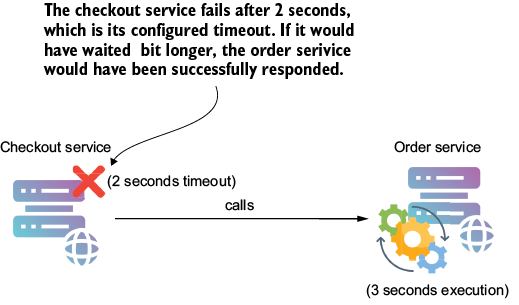
Use the timing diagram to see how a checkout request can fail at the client while the order service continues processing. section 12.3.3
