A transition moves a CSS property from one value to another. Its timing function controls how quickly the intermediate values change during that movement: at a steady rate, accelerating, or decelerating. It does not set the duration or the delay; those are separate transition settings. section 15.1 section 15.2
Start with a keyword that suits the interaction:
- `linear` changes at a constant rate. section 15.2
- `ease-in` starts slowly and accelerates; accelerating motion can help attract attention. section 15.2 section 15.6
- `ease-out` starts rapidly and slows toward the end; decelerating motion can signal that an action has taken effect. section 15.2 section 15.6
Compare the motion in a browser
Position a box at `left: 0`, move it to `left: 400px` when its container is hovered, and give it `transition: all 1s linear`. Then replace `linear` with `ease-in` and `ease-out`. The box reaches the same destination in the same duration, but its movement feels different. This demonstrates timing clearly; for production motion, consider a transform instead of transitioning `left` for performance reasons. section 15.2 section 16.5
Figure 15.4 The Bézier curves of timing functions illustrate how the value changes over time.
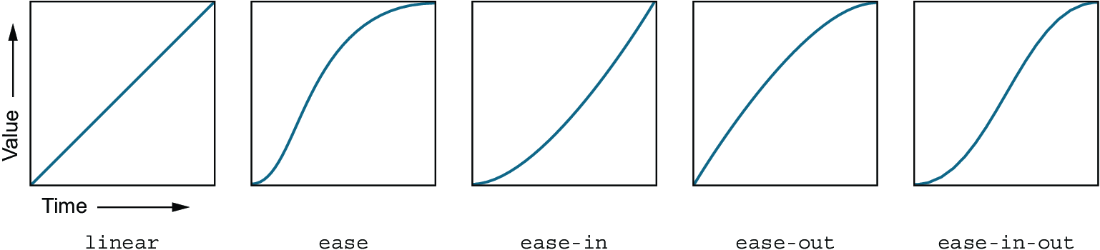
The curves show time progressing from left to right and the property value progressing toward its destination. A straight line is steady; curved lines change the rate. section 15.2.1
For more control, use `cubic-bezier()` instead of a keyword. Its four values define a custom curve. In browser DevTools, inspect an element, open the timing-function curve editor, and drag its control handles to explore shapes; the resulting `cubic-bezier()` value can be used in CSS. A curve can even make a translated label briefly overshoot its final position before settling back. section 15.2.1 section 16.2.2
A timing function can be specified for each transitioned property: `transition: border-radius 0.3s linear, background-color 0.6s ease;`. Keyframe animations also accept keyword or Bézier timing functions through `animation-timing-function`. When adding motion, account for reduced-motion preferences. section 15.1 section 17.1

