TorchServe is a black-box model server for deploying PyTorch models behind unified HTTP and gRPC prediction APIs. It separates a prediction service’s frontend from model execution, so the same backend can serve PyTorch models regardless of their prediction algorithm. section 7.2 section 7.2.4
A TorchServe instance has a frontend, model-worker backend, and model store. The frontend handles requests and model lifecycles; workers run inference; the model store holds loadable model packages. A prediction request is routed to a worker that loads the model, preprocesses input through its handler, and returns a result. section 7.4.2 section 7.2.6
Figure 7.9 A TorchServe architecture diagram (Source: Kuldeep Singh, “Deploying Named Entity Recognition model to production using TorchServe,” Analytics Vidhya, 2020)
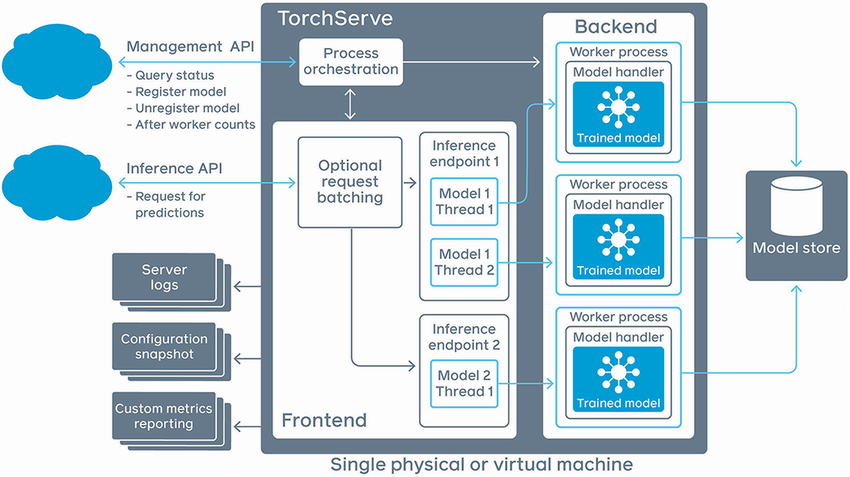
The architecture diagram distinguishes the inference path from the management path and shows how frontend, workers, and model store cooperate. section 7.4.2
Models must be packaged as TorchServe .mar archives and registered before use. An archive includes model metadata, serialized weights, and a handler that initializes the network, preprocesses input, runs inference, and postprocesses output. This packaging lets the generic server execute models without built-in knowledge of their algorithm or data schema. section 7.2.5 section 7.2.6
The management and inference workflow is:
- Place .mar model archives in the model store and register a model through the management API; placing files alone does not load them. section 7.2.4 section 7.2.5
- Set worker counts for a model or version to allocate serving resources. section 7.2.5 section 7.4.2
- Send binary prediction input to a unified HTTP or gRPC inference endpoint, optionally selecting a model version. section 7.2.5
Run and call a containerized predictor
Mount a local model-store directory into the TorchServe Docker container, start the server, then start the frontend prediction service. The frontend translates its request into a TorchServe gRPC prediction call; alternatively, clients can POST directly to /predictions/{model_name} or a versioned endpoint. section 7.2.1 section 7.2.5
# 1. Create model store directory for torch serving
# and copy model files (mar files) to it
mkdir -p /tmp/model_store/torchserving
cp sample_models/intent.mar /tmp/model_store/torchserving                       #1

# 2. Run the torch serving container
docker pull pytorch/torchserve:0.4.2-cpu
docker run --rm --shm-size=1g \
       --ulimit memlock=-1 \
       --ulimit stack=67108864 \
       -p8080:8080 \
       -p8081:8081 \
       -p8082:8082 \
       -p7070:7070 \
       -p7071:7071 \
       --mount type=bind,source=/tmp/model_store/torchserving,target=/tmp/models#2
pytorch/torchserve:0.4.2-cpu torchserve --model-store=/tmp/models

# 3. Register intent model through torchserving management api
curl -X POST  "http:/ /localhost:8081/models?url=                               #3
 intent_1.mar&initial_workers=1&model_name=intent"                            #3

# 4. Query intent model in torch serving with default version.
curl --location --request GET 'http:/ /localhost:8080/predictions/intent' \
--header 'Content-Type: text/plain' \
--data-raw 'make a 10 minute timer'

# 5. Query intent model in torch serving with specified version - 1.0
curl --location --request GET 'http:/ /localhost:8080/predictions/intent/1.0' \
--header 'Content-Type: text/plain' \
--data-raw 'make a 10 minute timer'
The listing gives a runnable sequence for creating a model store, launching a TorchServe container, registering an archive, and querying a model. section 7.4.2
Running one container is suitable for a demonstration, but scaled deployments complicate registration, model-file distribution, and balancing models across instances behind a load balancer. In Kubernetes, a proxy sidecar can receive prediction requests, download and register models into its colocated TorchServe container, and hide those management details from callers. section 7.2.7
TorchServe reduces custom predictor code and supports multiple models and versions, but it requires its own API contracts and .mar packaging format. It is a model-server alternative to a self-built predictor when PyTorch compatibility and operational model management outweigh the need for a custom serving implementation. section 7.2.4 section 7.4.2
