Tornado is used to expose robot capabilities through HTTP while keeping the web server running as one long-lived process. That process can hold exclusive access to robot motors and allow only one movement request at a time, avoiding race conditions without adding complex coordination. section 5.2
Figure 5.2 Software stack: the Tornado web framework will expose robot commands over the HTTP protocol.
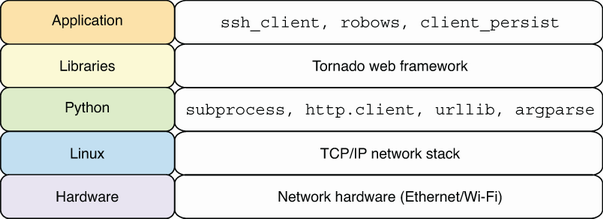
The software stack places Tornado between HTTP clients and robot commands, making browser or network requests a controlled interface to the robot. section 5.2
A minimal service combines three Tornado pieces: `RequestHandler` defines request behavior, `Application` routes paths to handlers, and `IOLoop` starts the server. A handler’s `get` method responds to an HTTP GET request. Writing a dictionary automatically returns JSON and appropriate content-type headers. section 5.5.1
Time service
Create a handler that reads the current time and writes `dict(stamp=stamp)`. Route `/` to that handler, listen on port 8888, and start `IOLoop.current().start()`. A request such as `curl http://localhost:8888/` returns a JSON timestamp, providing a quick check that the robot server is reachable. section 5.5.1
For a browser-facing application, a handler can render an HTML template instead of writing JSON. Set `template_path` to a templates directory, then call `self.render('basic.html', stamp=stamp)`. Application settings can enable debug mode from the `ROBO_DEBUG` environment variable, supporting automatic reloads and generated error pages during development. section 6.3.1
Use Tornado as the web boundary for robot functions:
- Serve dynamic status pages, such as a page showing the robot server’s current time. section 6.3.1
- Expose remote robot web services over HTTP while serializing motor-movement requests. section 5.2
- Provide a Motion JPEG server so devices on the network can view the robot camera stream. section 10.0
Tornado’s templates support dynamic web content, while server logs reveal incoming requests and responses. A mobile-friendly control interface can use large buttons sized for touch screens; browser Developer Tools can then help inspect performance. section 6.5
Tornado runs as part of a Python robot software stack on Linux and is presented as suitable for production-oriented applications. It sits alongside hardware-control and computer-vision libraries, while application code uses its web interface to connect people and network clients to robot behavior. section 1.2.5 section 1.3.5
