A touchpoint is an interactive interface area that users activate by clicking, pressing, or touching. It includes controls such as buttons, links, and form fields. section 7.2.2
Touchpoints matter because clear feedback helps users understand what happened and what to do next. A hover change can signal that a button is clickable, while an error animation can make a failed submission easier to recognize. section 7.2.2
Design touchpoints by checking:
- What users are trying to do at each control, including what happens after successful or failed form submission. section 7.2.2
- Whether the control provides a visible state change that clarifies its role and the user’s next step. section 7.2.2
- Whether mobile controls are large enough to use with a thumb without zooming, with layouts adjusted rather than merely scaled down. section 10.9.2
A mobile booking flow
A vacation website can enlarge its search bar, stack content sections, and use full-width areas so users can navigate and activate controls more easily on a phone. section 10.9.2
Figure 5.7 A simple user journey map that depicts the scenario of a user booking a train ticket and their experience with the app. User journey maps can be created with tools such as Figma, Illustrator, or even Microsoft Word.
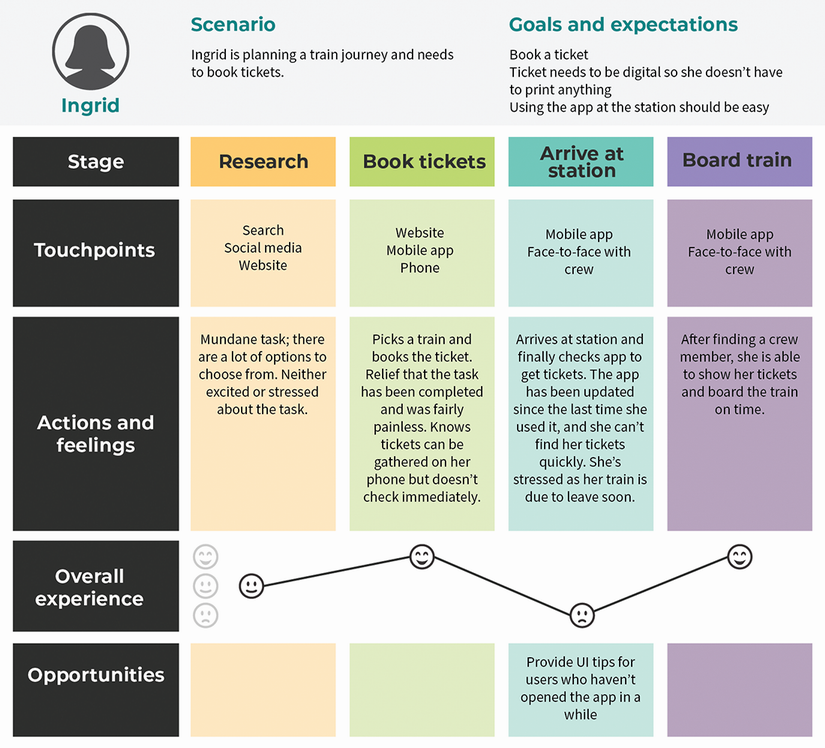
Use a journey map to connect digital touchpoints, such as a healthcare website, with physical touchpoints, such as visiting a provider, and identify gaps in the user experience. section 5.2.2

