A training step is one pass through the training procedure that updates a model from training data. For a Flux LoRA, steps are the useful progress counter: set a total, save versions along the way, then judge which saved point produces the best images. More steps are not automatically better; the final checkpoint can be less useful than an earlier one. section 13.3 section 13.5
Use steps as a practical training workflow:
- Set an initial total of 6,000 steps; it can be raised later if the result still needs training. section 13.3
- Save checkpoints periodically with Save Every; retaining more saved states gives more choices if later training overtrains the LoRA. section 13.3
- Compare generated samples from different step counts rather than assuming the last saved state wins. section 13.5
- Test both ordinary and stylized prompts, since a checkpoint that handles familiar images may fail to preserve the subject in a new style. section 13.5.3
Choosing a Keats checkpoint
At 1,250 steps, the LoRA begins to resemble Keats but still struggles. Around 4,750 steps it produces a convincing dog; among stylized tests, step 5,500 is the first candidate that captures Keats successfully in both a depression-era photograph and a cartoon. That makes 5,500 a better choice than blindly taking step 6,000. section 13.5.2 section 13.5.3
Figure 13.22 Exploring how well the stylized Keat looks.
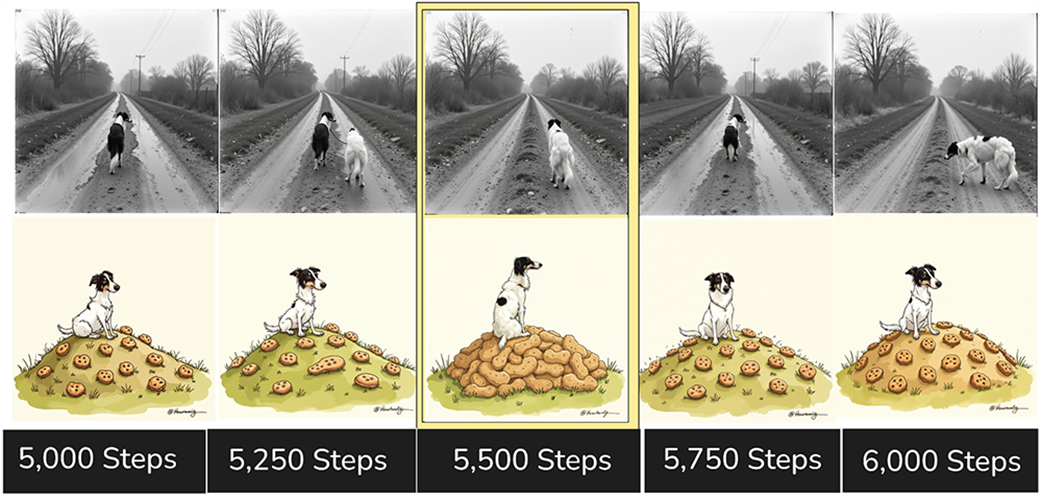
Compare stylized samples at nearby checkpoints to see why the strongest general-looking checkpoint may not be the best final LoRA. section 13.5.3


