A checkout button that leaves a 0 behind
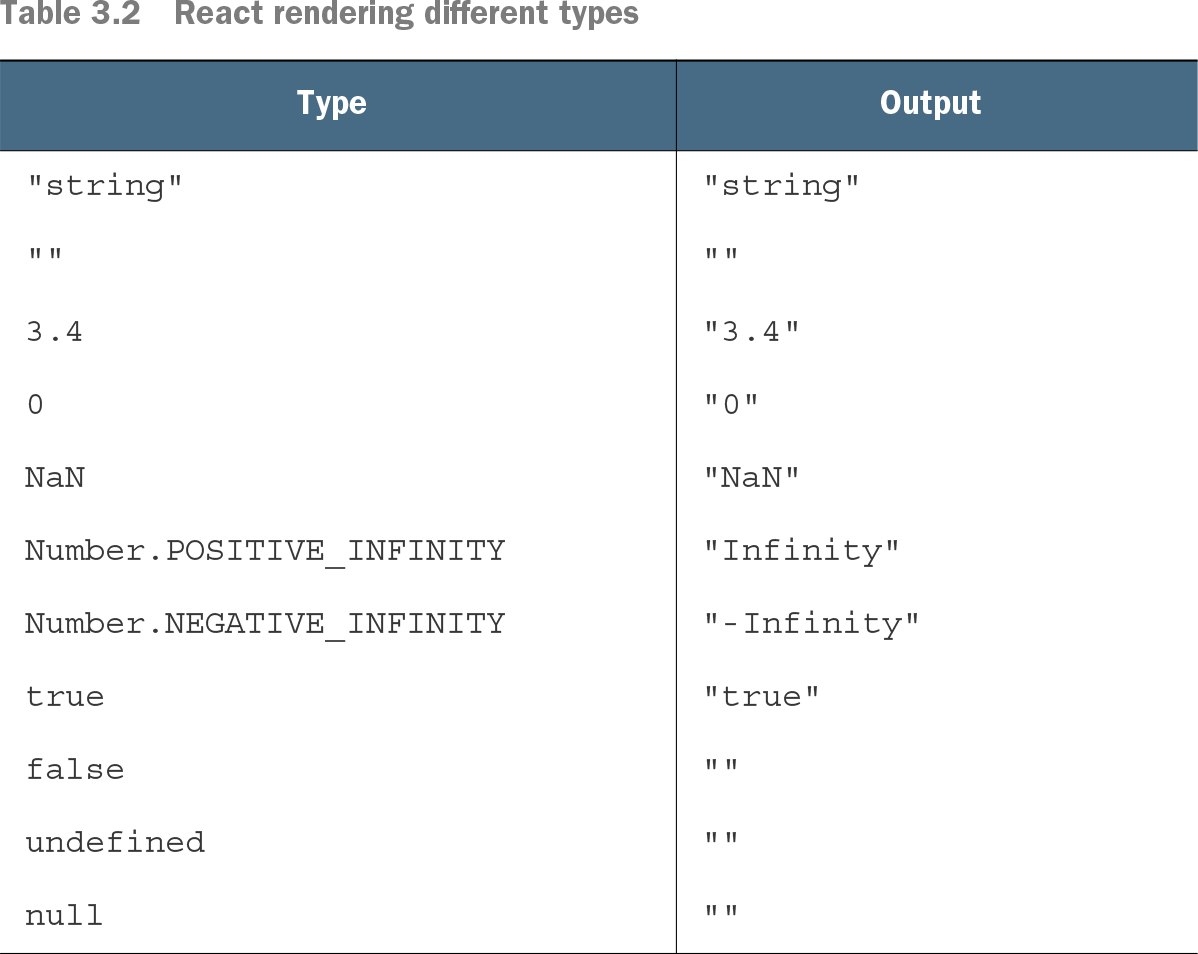
Consider `{items.length && <button>Checkout</button>}`. With an empty cart, `items.length` is 0. The `&&` expression returns that 0, and React displays it instead of displaying nothing. section 3.4.3
Truthiness is how JavaScript treats a value when a Boolean decision is needed. A truthy value acts like `true`; a falsy value acts like `false`. JavaScript's falsy values are `false`, `0`, `""`, `null`, `undefined`, and `NaN`. section 3.2.6
Render an element only when needed
In JSX, `{isVerified && <Checkmark />}` displays a checkmark when `isVerified` is truthy. The `&&` operator returns its first operand if that operand is falsy; otherwise, it returns the element. When the first operand is `false`, React renders nothing. section 3.2.6
Make numeric conditions explicit
For the cart, use `const hasItems = items.length > 0;` followed by `{hasItems && <button>Checkout</button>}`. Now an empty cart makes the expression return `false`, which React renders as nothing. The distinction matters: both 0 and `false` are falsy, but React displays 0. section 3.4.3
Table 3.2 React rendering different types (view table figure)
Compare how React displays primitive values: `false`, `null`, and `undefined` appear as empty strings, while 0 appears as `"0"` and `NaN` as `"NaN"`. section 3.4.3