A tumbling window divides an event stream into consecutive, fixed-duration intervals. Each interval begins when the previous one ends, so an event belongs to one window only. In Fluent Bit stream processing, tumbling windows enable aggregate queries such as counts, sums, and averages over buffered events without recalculating overlapping periods. section 8.4.2 section 8.10
Figure 8.3 Visualization of a tumbling window in terms of how it sees the data. Note that there is no overlap of the window periods.
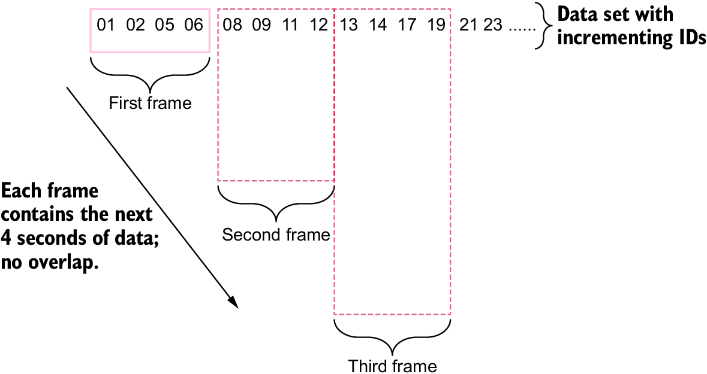
The adjacent intervals show the defining property: window periods do not overlap. section 8.4.2
The window duration is also its advance interval: a 4-second tumbling window completes one four-second calculation, then starts a new four-second calculation. Unlike a hopping window, it does not revisit events from the preceding interval. This makes aggregate output more predictable because a completed calculation no longer falls within a later calculation’s scope. section 8.4.2
Sum values every 4 seconds
Use WINDOW TUMBLING (4 SECOND) in a stream task to emit the sum of rand_value once per completed four-second interval. With four input records valued at 2, the output reports SUM(rand_value) as 8 at the interval boundary, then starts collecting the next interval. section 8.4.2
Listing 8.6 Stream processor with tumbling window: query4.conf
[STREAM_TASK]
  name selectTaskWithTag
  exec SELECT record_tag(), rand_value FROM TAG:'random-num';

[STREAM_TASK]
  name selectSumTask
  exec SELECT now(), sum(rand_value) FROM TAG:'random-num'
 WINDOW TUMBLING (4 SECOND);     #1
This stream-task configuration places a four-second tumbling window directly on an aggregate SELECT query. section 8.4.2
Choose a tumbling window when the operational goal is interval-based analysis:
- Track system-use patterns across a day or determine whether hardware faults are increasing. section 8.4.4
- Reduce repeated computation relative to overlapping hopping windows; over one minute, 10-second tumbling windows produce six analyses versus 11 for 5-second hopping intervals. section 8.4.4
- Produce an aggregate stream, then route follow-up events according to the completed value, such as counts above or at most a threshold. section 8.8
Window length remains a configuration trade-off. Intervals that are too long can obscure useful measurements, while a window duration equal to event input timing can reintroduce timing uncertainty through nanosecond precision. Validate the configuration for the data and detection goal rather than treating a duration as universally correct. section 8.4.2 section 8.4.4
A tumbling window can be used in a chained stream design: first create an untagged stream containing a five-second count, then consume that stream to create tagged outputs for counts greater than 2 or counts equal to or below 2. The completed interval becomes the handoff point between aggregation and routing. section 8.8


