A type ramp is a coordinated set of font families, sizes, styles, and usage rules. It gives related pages a consistent visual hierarchy and helps typography communicate tone, importance, and structure. section 8.2.3 section 8.0
Build a practical type ramp by making these decisions:
- Map semantic roles to styles: headings and subheadings can use h1–h4, while body copy belongs in paragraph elements rather than heading tags. section 8.2.3
- Start with body copy, commonly 16–18px, then choose heading sizes with a type-scale calculator and adjust them for the chosen typeface. section 8.2.4
- Prefer relative units such as rem or em when defining CSS sizes so users can enlarge text and the typography can respond across screens. section 8.2.4
- Set line heights and spacing against a baseline, then check readability because line length, font family, and visual density affect the result. section 10.5
A compact ramp with vertical rhythm
One practical starting point uses a 16px body size, a 28px subtitle, a 36px subheading, and a 48px main heading. With a 12px baseline, line heights can be 20px for paragraphs, 35px for subtitles, and 36–48px for larger headings; margins then restore alignment where needed. section 10.5
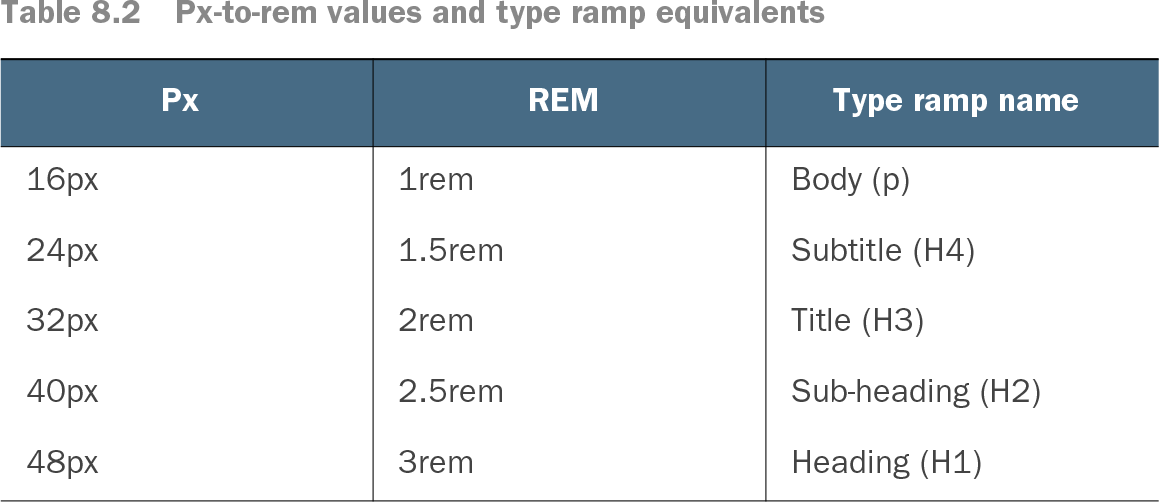
Table 8.2 Px-to-rem values and type ramp equivalents (view table figure)
Use the px-to-rem table to compare a simple body-to-heading scale and its semantic type-ramp names. section 8.2.4