UI logic is presentation-layer logic that determines how application information appears and how interface elements behave. It combines layout—what goes where—with behavior—what elements do. section 9.3.2
Separate UI logic from the state and operations that support it:
- Layout places pages, layouts, and controls such as a Grid, Label, Entry, and Button on screen. section 9.3.2
- Behavior determines what controls do, such as changing a label’s size or a switch’s color in response to conditions. section 9.3.2 section 9.3.3
- Keep control state and presentational logic in the ViewModel when using MVVM, while the View owns display and interaction behavior. section 9.3.3
Switch state and appearance
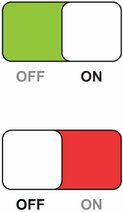
A switch’s on/off state belongs in the ViewModel. Its UI logic makes the switch green when on and red when off. section 9.3.3
Figure 9.4 A Switch control. In the top example, the switch is in the on position (its state), and its background is green (shown here as light gray; its behavior). In the bottom example, the switch is in the off position, and its background is red (shown here as dark gray). The switch’s state should be managed by the ViewModel, and its behavior should be managed by the View.
Compare the switch’s state with its state-dependent visual behavior. section 9.3.3
