A uniwidth font keeps each character the same width across its available weights at a particular size. Unlike a monospace font, it may give different characters different widths, so it can remain proportional. section 5.2.2
This matters when regular and bold text share a table: switching weights does not shift characters horizontally, helping columns and emphasized values stay visually stable. Uniwidth is especially useful alongside tabular and lining numbers. section 5.2.2
Use the idea with a little practical judgment:
- Prefer a font with tabular and lining numbers when displaying large numeric tables. section 5.6
- Treat uniwidth as a bonus rather than a hard requirement; weight-related width differences may be minor at smaller sizes. section 5.2.2
- Do not confuse uniwidth with monospace: monospace makes every character equally wide, while uniwidth preserves each character's width across weights. section 5.2.2
Recursive Sans Linear
Recursive in its Sans Linear flavor is identified as a rare font combining tabular numbers, lining numbers, and uniwidth characters, with a free Google Fonts option. section 5.2.2
Figure 5.14 On the left, we see that the characters of Roboto are not the same width across all weights, while those of Recursive Sans Linear are. At smaller sizes, the width difference in Roboto does not appear to be very great (even though I used the thinnest and thickest possible weights to contrast the regular weight, in the middle), so if you don’t have a uniwidth font available to you, it’s likely not the end of the world.
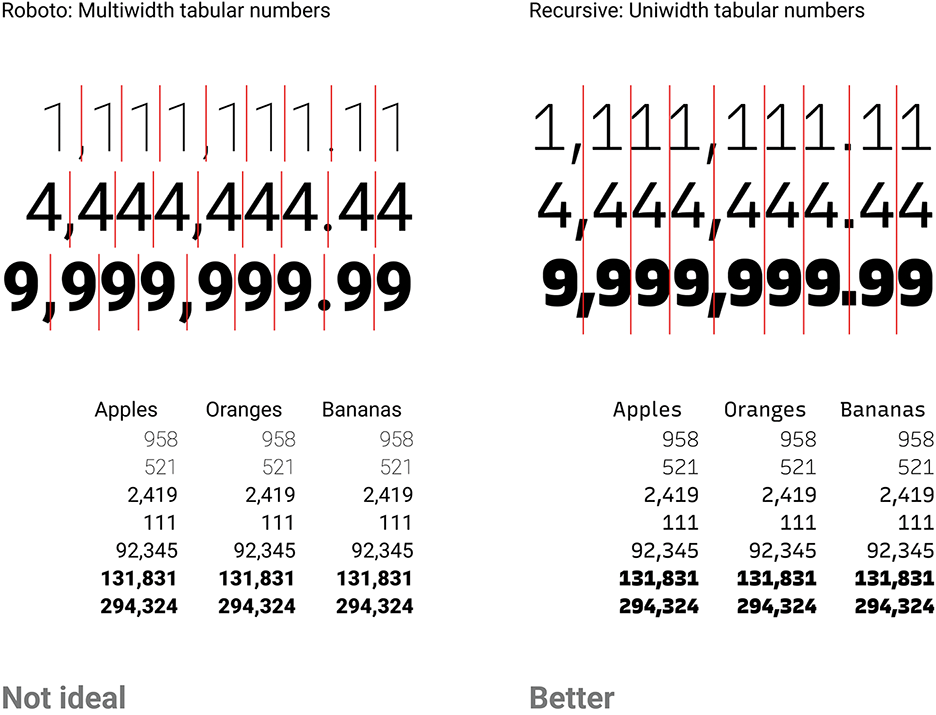
Compare Roboto, whose character widths vary across weights, with Recursive Sans Linear, whose character widths remain consistent. section 5.2.2
