An update selection contains the document elements already present and still associated with data items after a D3 data join. These elements can retain their position and style or receive updated values. section 7.4.2
During a data update, D3 matches data to elements. A key function such as d => d.uid keeps continuing data attached to the same elements instead of matching by DOM order. section 7.4.2 section 7.5
Use the update selection alongside the other results of a join:
- Enter selections create elements for newly added data. section 7.4.2
- Update selections modify elements that remain associated with data. section 7.4.2
- Exit selections remove elements whose data is no longer present. section 7.4.2
- Pass separate enter, update, and exit functions to join() when each lifecycle needs different behavior. section 7.4.2 section 7.5
Filtering a cetacean scatterplot
Filtering the scatterplot by hemisphere leaves matching circles in the update selection. Their positions, sizes, or styles can change, while new species enter and removed species exit. A key function preserves each continuing circle's association with its species. section 7.4 section 7.4.2
Figure 7.19 The enter selection represents new elements that need to be created, while the update selection contains the elements that are already displayed on the screen and will remain on the screen. The exit selection is made for elements that need to be removed from the DOM.
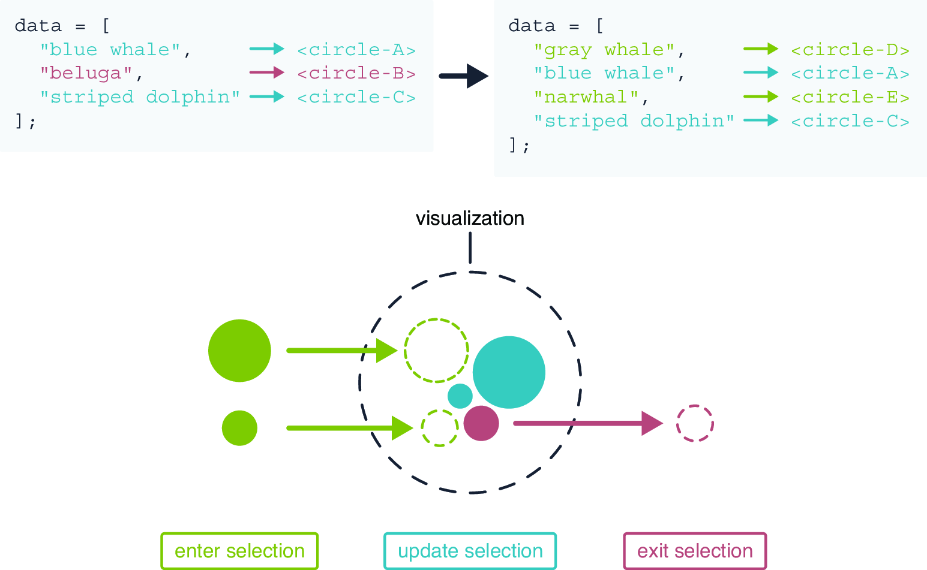
Compare the enter, update, and exit selections as the three outcomes of a data join. section 7.4.2
