The upload-artifact action stores files produced by a workflow job so a later job can retrieve them. Invoke it with uses rather than run, then provide a name and path through with. section 12.2.2
Upload a signed Android package
After building a signed Android App Bundle, add this final job step:\n\n- name: Upload Android artifact\n uses: actions/upload-artifact@v3.1.0\n with:\n name: mauistocktake-android-build\n path: src/Presentation/MauiStockTake.UI/bin/Release/net7.0-android/*Signed.aab\n\nThe name identifies the artifact for retrieval in a later job. The path selects the generated AAB; a wildcard avoids hard-coding the complete filename. section 12.2.2
Figure 12.8 The first step in this job checks out the code from the repo. The next will retrieve the Android signing keystore from GitHub Actions secrets and convert it from a base64 string. The next two steps set up dependencies (.NET and the .NET MAUI workloads). After that, the next step creates a signed build, and the final step uploads the signed build to GitHub, ready for the deploy job to pick it up later.
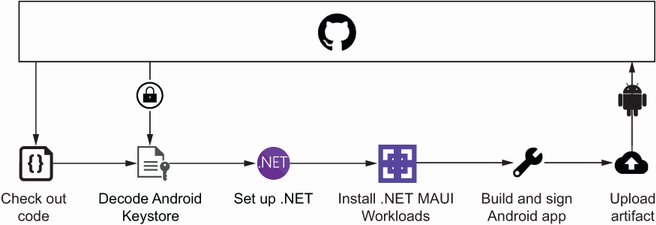
Shows the action at the end of an Android job, after checkout, secret recovery, dependency setup, and signed build creation. section 12.2.2
