A URL path identifies the resource or location targeted by an HTTP request. In a complete web address, the hostname identifies the server location, while the path is the part that follows the domain name. For example, the path in www.example.org/account/manage is /account/manage. section 1.4.1 section 3.6
Mapping a path in ASP.NET Core
A minimal API connects an HTTP verb and path to response logic: app.MapGet("/", () => "Hello World!"); This endpoint returns plain text when a client sends a GET request to the root path /. MapGet's first argument selects the URL path; its second argument generates the response. section 3.6
Figure 1.2 Requesting a web page. The user starts by requesting a web page, which causes an HTTP request to be sent to the server. The server interprets the request, generates the necessary HTML, and sends it back in an HTTP response. Then the browser can display the web page.
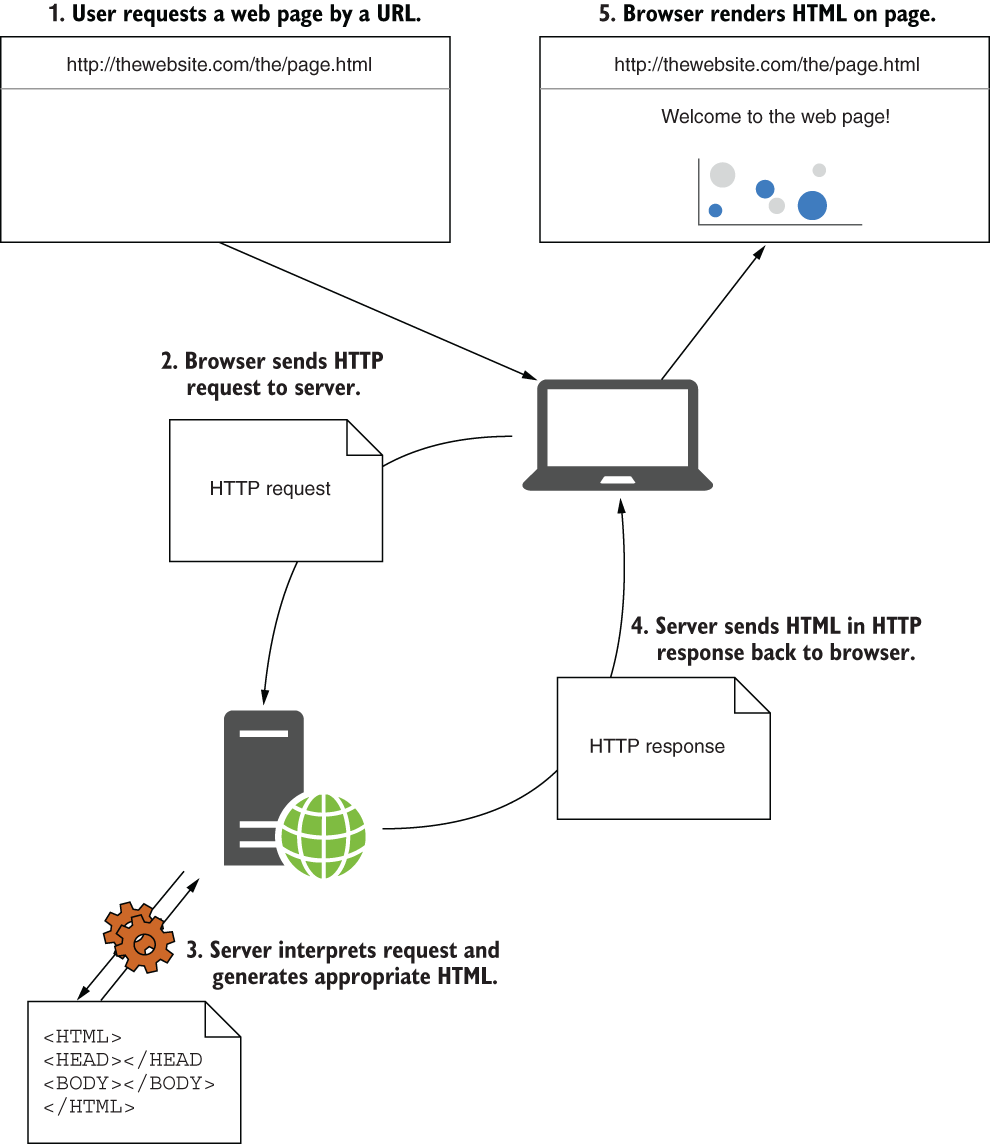
Follow the request from a browser to the server and back through the HTTP response. section 1.4.1


