A use case diagram models an application's externally visible behavior by grouping user goals and showing which external actors interact with them. It gives requirements a runtime context and establishes the application's boundary. section 3.5 section 3.6
Build a diagram by identifying:
- The application boundary, drawn as a box containing the use cases. section 3.6.1
- Short, descriptive use-case names in verb–noun form, such as “Add Book” or “Log In Customer.” section 3.6.1
- Actors outside the application, including people, databases, or other systems. section 3.6.1
- Interaction lines connecting each actor to the use cases they can perform. section 3.6.1
Book catalogue
An advanced book catalogue diagram groups six use cases inside the application boundary and connects customers, librarians, and a backend database to their interactions. section 3.6.1
Figure 3.4 A UML use case diagram containing the names of six use cases for an advanced version of our book catalogue application. The labels in the dashed boxes and the dashed arrows indicate the various components of the diagram. When drawing a use case diagram, do not include these labels and arrows.
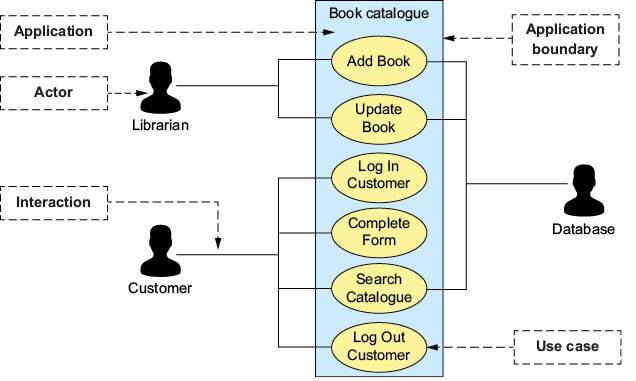
Use the figure to distinguish the boundary, actors, use cases, and interaction lines; omit its explanatory dashed labels when drawing. section 3.6.1

