useCallback memoizes a function reference between renders until its specified dependencies change. Its interview-relevant role is preventing unnecessary function recreation, especially when functions pass as props. section 4.5 section 4.1
Explain useCallback through the performance reasoning around a render problem:
- Inspect excessive renders with React Developer Tools before optimizing; unexpected prop changes are a common cause. section 4.5
- Use useCallback alongside React.memo when a child receives a function prop whose reference should remain stable. section 4.5
- Treat memoization as targeted rather than automatic: retest after each change and confirm that the bottleneck improved. section 4.5
- Mention React Compiler when relevant, because React 19 beta or later can automate some memoization and reduce manual optimization. section 4.5
Interview scenario
A candidate notices a child rendering repeatedly after its parent updates. They inspect props with React Developer Tools, identify a recreated function passed as a prop, and propose useCallback as a targeted optimization. A strong follow-up explains why React.memo may be needed and how the Profiler verifies the result. section 4.5 section 4.1
Figure 4.12 User interface and Profiler tab view in React Developer Tools.
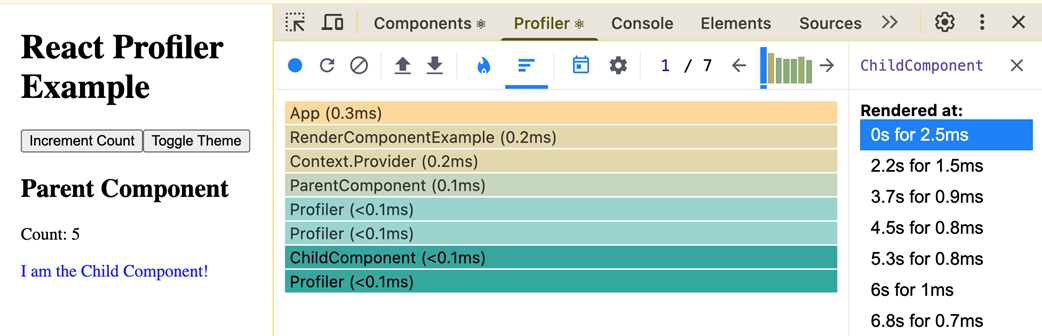
Use the React Developer Tools Profiler view to locate rendering bottlenecks before deciding whether useCallback is justified. section 4.5