useRef() gives a React component a ref object for controlling a particular element. Attach the ref to the element, then read its current instance inside useEffect(). section 8.5.1
Use the ref-and-effect pattern to let D3 control part of a React visualization:
- Import useRef and useEffect from React, then initialize a ref such as scatterplotRef. section 8.5.1
- Attach the ref to the SVG element that D3 should control, such as <g ref={scatterplotRef}></g>. section 8.5.1
- Inside useEffect(), select scatterplotRef.current with d3.select() and build the visualization there. section 8.5.1
Controlling a scatterplot group
const scatterplotRef = useRef(); useEffect(() => { const scatterplotContainer = d3.select(scatterplotRef.current); // Build scales, axes, and marks with D3 here. }, []); return <g ref={scatterplotRef}></g>;
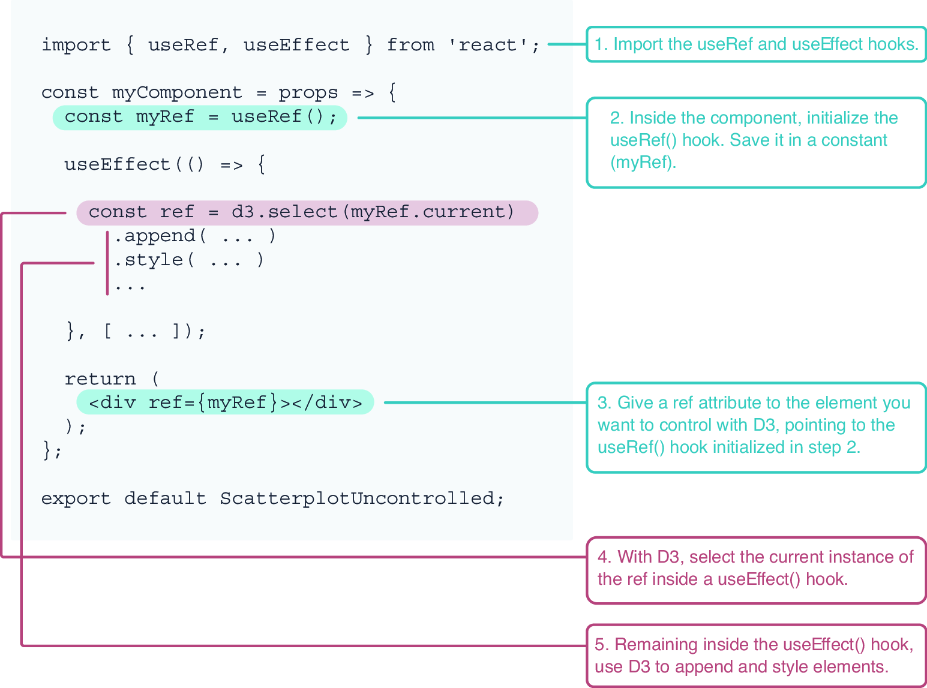
Figure 8.5 To let D3 control a portion of the DOM in React, we first need to import the useRef() and the useEffect() hooks into our component. We then initialize a ref and attach it as an attribute to the element we want to control with D3. Finally, inside a useEffect() hook, we select the current instance of the ref and start using D3 as usual.
The ref connects React’s rendered element to D3 code executed in useEffect(). section 8.5.1


