useState gives a function component a state value and a setter. In TypeScript, the key decision is whether the initializer describes every value that state may hold later. An initial boolean or string usually gives useful inference; a placeholder such as null or an empty array may not. section 6.1.1
Type an undecided response
An appointment response can start undecided, then become accepted or rejected. `const [isAccepted, setIsAccepted] = useState<null | boolean>(null)` permits all three states. Without the type argument, TypeScript infers `null`, so `setIsAccepted(true)` fails. A separate message can use `const [message, setMessage] = useState("")`; submission can wait until `typeof isAccepted === "boolean"`. section 6.1.1
Choose the type from the intended updates, not just the starting value:
- For tags, `useState([])` infers `never[]`, which rejects adding a string. Use `useState<string[]>([])`, then an update such as `setTags((oldTags) => [...oldTags, newTag])`. section 6.1.1
- For a visibility lookup keyed by user, initialize with `useState<Record<string, boolean>>({})`. section 6.1.1
Local state can also underpin shared application data. A goal tracker uses one useState call for its list and another for the current item, with functions wrapping their setters and context distributing the data. A version built with useState alone works, but is not treated as the ideal endpoint; useReducer, Redux Toolkit, Zustand, and XState are other approaches considered for the same application. The choice depends on the data-management needs rather than a rule that every state value needs another library. section 8.3 section 8.1
For debugging, React Developer Tools’ components inspector can display and change a useState value directly; the component re-renders without calling its usual setter. Context is different: a consumer’s context value can be inspected there, but changes must be made at the provider. section 4.4.3
Figure 4.14 When you’re inspecting a stateful component with a useState or useReducer hook, you can interact with the state directly through the components inspector. You can manipulate the value, just as you can manipulate properties, as shown in figure 4.12.
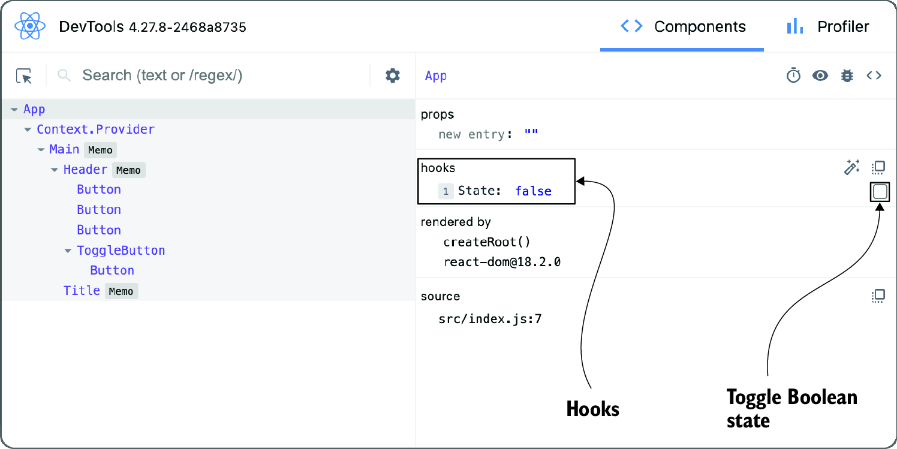
The inspector view shows where a hook state value can be changed directly while examining a stateful component. section 4.4.3


