A NumPy view is another array object that interprets existing data without copying it. This matters when transforming large arrays: a copy consumes additional memory and takes time proportional to the data moved, while creating a view can be much cheaper. Because the arrays share storage, changing the original can also change what the view shows. section 4.1.1 section 4.4
Check whether a flip shares data
import numpy as np a = np.arange(10).reshape(2, 5) view = np.flipud(a) copy = view.copy() a[0, 0] = 99 print(view[-1, 0], copy[-1, 0]) # 99 0 print(np.shares_memory(a, view), np.shares_memory(a, copy)) # True False The changed value appears through the flipped view but not the independent copy. Use np.shares_memory to check sharing rather than inferring it from an operation’s name. section 4.1.1
Shape gives the number of elements along each dimension; strides give the byte step to the next element along each dimension. Together they let the same storage support different layouts. For ten four-byte integers, a linear array has strides (4,), its 2 × 5 reshape has (20, 4), and its transpose has (4, 20). Reversing the linear array gives a negative stride. section 4.1.2
For a grayscale image array, choose the transformation that matches the intended result—not merely one with the desired shape:
- Reverse a row or column axis with a negative-step slice to flip the image; slice a region to crop it. section 4.1.3
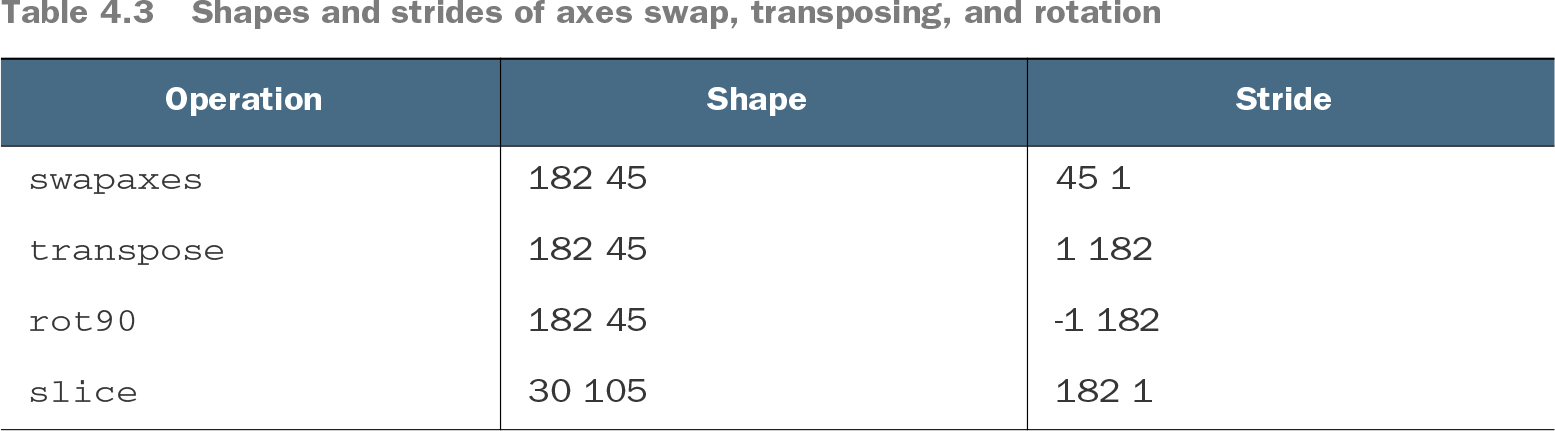
- Transpose to exchange axes, or use np.rot90 for a quarter-turn. Reshaping to the transposed shape groups the same bytes differently and does not produce the same image. section 4.1.3
Table 4.3 Shapes and strides of axes swap, transposing, and rotation (view table figure)
Compare the shapes and strides of differently transformed views of the same image data. section 4.1.3
Measure the benefit in the workload that matters. In the supplied array-size comparison, view-creation time stays nearly flat as arrays grow, whereas copy time rises sharply. A view is not guaranteed for every transformation, so check memory sharing when avoiding a copy is important. Directly setting arbitrary strides with as_strided requires extreme care. section 4.1.1 section 4.1.3