A virtual cluster is a Kubernetes-like cluster created inside a host Kubernetes cluster. It provides tenants with an isolated Kubernetes API server while sharing the host cluster’s underlying capacity. This offers an alternative to choosing between shared Kubernetes namespaces and separate physical clusters. section 6.3.1
Use a virtual cluster when teams need cluster-wide access and control of the Kubernetes API without affecting other tenants. If teams do not need Kubernetes API access, a namespace-based approach is recommended instead. section 6.3.1
A platform can use virtual clusters to provide repeatable development environments:
- Application teams request an environment through platform APIs. section 6.3.2
- Crossplane compositions define the provisioning process and use the Crossplane Helm provider to create a virtual cluster. section 6.3.2
- The platform installs the Conference application Helm Chart into the new environment. section 6.3.2
- Teams connect to the isolated environment without risking other teams’ setups. section 6.3.2
Provision and connect to a development environment
Submit an Environment resource with apiVersion salaboy.com/v1alpha1, kind Environment, metadata.name team-a-dev-env, and a development composition selector. After provisioning, list environments with kubectl and connect with `vcluster connect team-a-dev-env-jp7j4 --server https://localhost:8443 -- zsh`. section 6.3.2
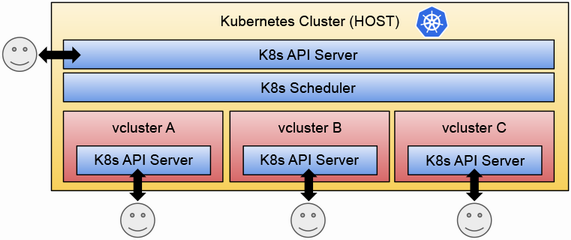
Shows where the virtual cluster’s isolation occurs: at the Kubernetes API-server layer inside the host cluster. section 6.3.1
