liveBook · Manning

Virtual interface

As explained in Acing the CCNA Exam: Volume 2 Advanced Networking and Security

A virtual interface is a logical wireless LAN controller interface associated with a virtual gateway IP address for controller functions such as relaying client DHCP messages.

A virtual interface is a logical wireless LAN controller interface associated with the Virtual Gateway IP Address configured during initial controller setup. It supports controller functions such as relaying client DHCP messages. section 21.2.1 section 21.4

Operational distinctions:

  • Represents a logical interface rather than a physical connector. section 21.2.1
  • Uses the Virtual Gateway IP Address for specific controller functions, including DHCP relay. section 21.2.1 section 21.4
  • Differs from dynamic interfaces, which map WLANs to VLANs, and from the AP-manager interface, which carries CAPWAP communication with LWAPs. section 21.2.1 section 21.4
Figure 21.9 WLC ports and interfaces. Ports are physical connectors that connect to other devices, and interfaces are logical entities in the WLC.
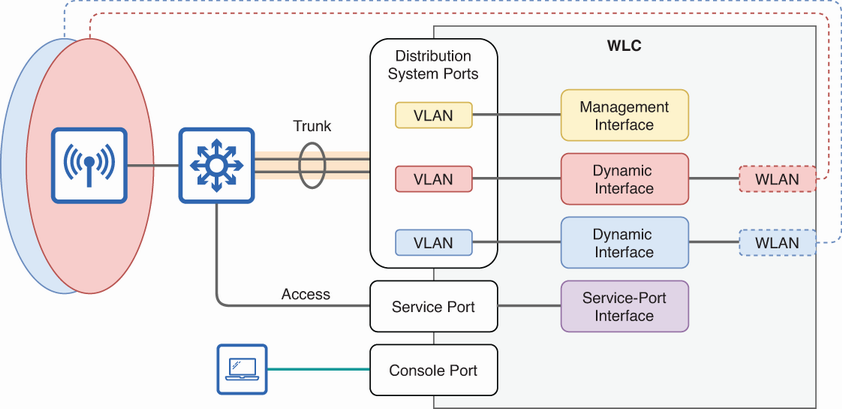
Use the interface diagram to distinguish logical WLC interfaces from the physical ports that connect to other devices. section 21.2.1

How Acing the CCNA Exam: Volume 2 Advanced Networking and Security covers it

How deep it goes
Defines the interface’s purpose and contrasts it with related WLC interfaces, but does not provide configuration or verification procedures.
Examples
Uses the Virtual Gateway IP Address configured during initial WLC setup as the interface address for DHCP relay.
What you can do after
Evaluate/understand which WLC interface handles DHCP relay and distinguish it from interfaces serving VLAN, WLAN, management, or CAPWAP roles.
How it connects
Connects the Virtual Gateway IP Address with DHCP relay and distinguishes virtual, dynamic, AP-manager, and management interfaces.

Related concepts

This explainer was generated by Manning's knowledge graph from the text of Acing the CCNA Exam: Volume 2 Advanced Networking and Security. The section links point to the parts of the book it draws on.