liveBook · Manning

Virtual joystick

As explained in High Performance Unity Game Development

A touch- or pointer-driven on-screen control that represents directional input for a game character.

A virtual joystick makes directional input easier to see and use in a game. Its two circles respond to pointer or touch movement: the outer circle appears where input begins, while the inner circle indicates the direction of movement. section 5.2

Figure 5.9 To make it easier to tell where the player is moving, we’ll add a virtual joystick to our game. The outer circle is positioned on mouse down. The inner circle is positioned using mouse move and shows the direction the player will be moving.
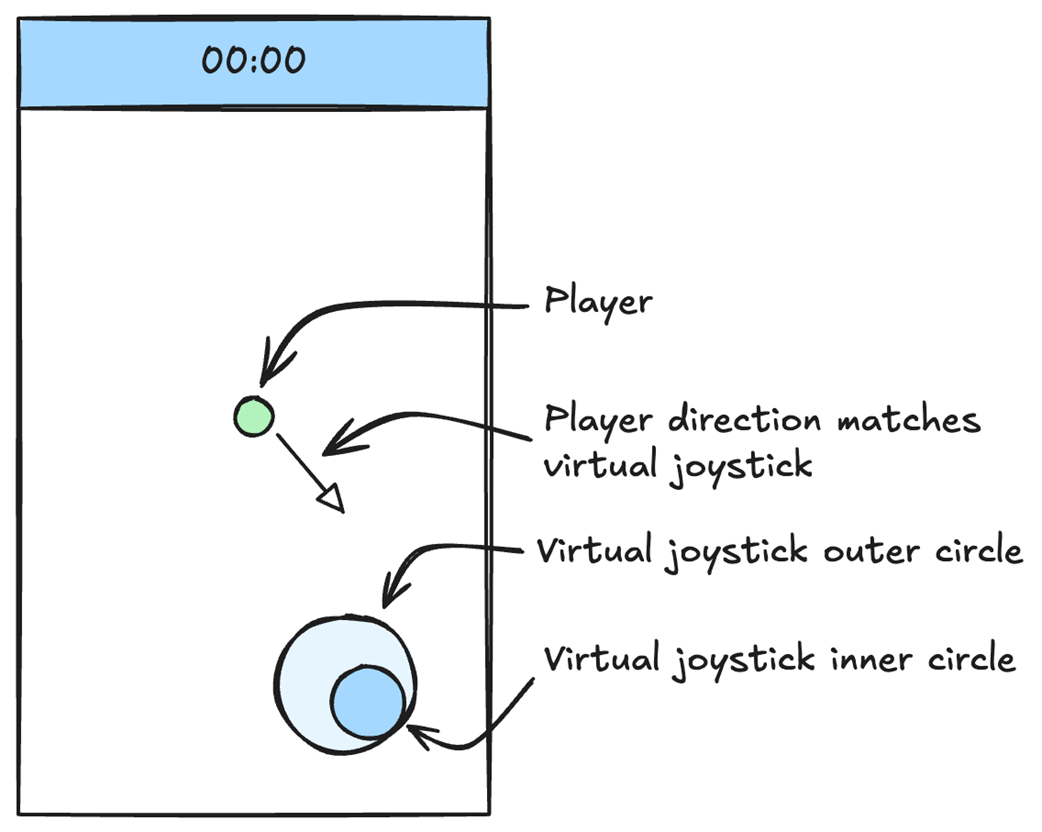
See how the outer and inner circles indicate the input origin and movement direction. section 5.2

How High Performance Unity Game Development covers it

How deep it goes
Explains the two-circle layout and positioning behavior, without detailing input-processing code.
Examples
Shows an outer circle placed on input start and an inner circle moved to indicate direction.
What you can do after
Understand how two on-screen circles communicate the origin and direction of movement input.
How it connects
Connects pointer or touch input with screen-to-world coordinate conversion.

This explainer was generated by Manning's knowledge graph from the text of High Performance Unity Game Development. The section links point to the parts of the book it draws on.