A virtual log file (VLF) is a logical subdivision inside a SQL Server transaction log file. Each VLF contains log blocks, and each log block holds log records: the records of executed DML and DDL statements. A log sequence number (LSN) identifies a log record through its VLF sequence number, log block ID, and log record ID. section 9.5
Mistake #47: treating log autogrowth as capacity management. When a log file grows, SQL Server automatically creates additional VLFs. Repeated small growth increments can therefore create too many VLFs, a condition called log fragmentation. This can cause performance problems, even where small growth avoids some immediate growth-related I/O effects. section 9.5 section 9.12
Figure 9.4 Transaction log cycle
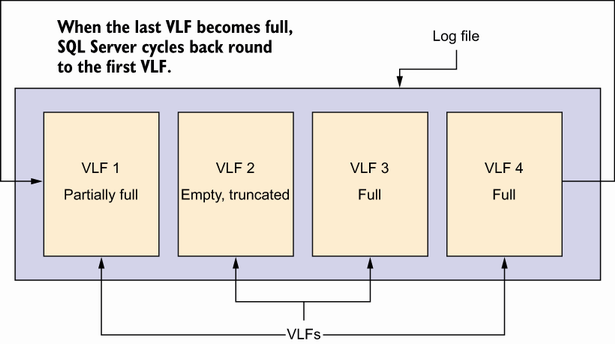
Use the transaction-log cycle diagram to see how SQL Server moves through VLFs and returns to reusable VLFs after reaching the end of the log. section 9.5
Log truncation does not truncate the physical log file. It marks eligible VLFs reusable. A VLF can be truncated only when it contains no active transactions; the log always retains at least one active VLF. Truncation can proceed only as far as the first active VLF, so one retained VLF can prevent reuse beyond that point. section 9.5 section 12.7
A VLF may remain active when it contains:
- A transaction that has not completed. section 9.5
- Transactions not yet streamed to replicas in an availability group topology. section 9.5
- Transactions not yet harvested by change data capture. section 9.5
Check a growing archive log
For MarketingArchive, count VLFs with sys.dm_db_log_info and compare the actual count with the log file size from sys.master_files. The supplied query reports an estimated minimum and maximum ideal VLF range alongside the actual count, turning a vague concern about log growth into a measurable condition. section 9.5
When VLF fragmentation is present, the corrective pattern is deliberate: shrink the transaction log, then let it grow again in larger increments. Avoid autoshrink, avoid relying on autogrow to manage database size, and do not add multiple log files expecting them to share normal log use; the first log file fills before the next is used. section 9.12
Find why reuse stopped
For the Marketing database, sys.dm_db_log_stats returns the total VLF count, active VLF count, and the last truncation holdup reason. If a VLF other than the one currently used fails to truncate, log_reuse_wait_desc identifies the reason; sys.databases exposes that value across databases. section 12.7 section 12.7
