A virtual network interface card (vNIC) gives a virtual machine network connectivity without a dedicated physical NIC. Each VM uses its vNIC to communicate with other VMs on the same server or with devices on an external physical network. section 17.1.1
Understand the traffic path and segmentation model:
- The hypervisor uses a virtual switch to forward frames between VM vNICs and the host machine’s physical NICs. section 17.1.1
- A VM operates as an independent network host even though its interface is virtual rather than physical. section 17.4
- Virtual-switch ports can use access or trunk mode, allowing VLANs to segment VMs. section 17.1.1
- Trunk links may connect the virtual switch to the host’s physical NICs and the host to external switches when VMs use multiple VLANs. section 17.1.1
VM connectivity through a virtual switch
A physical server runs multiple VMs. Each VM sends traffic through its vNIC to the hypervisor’s virtual switch. The switch forwards traffic either to another VM’s vNIC or through a physical host NIC toward the external network. Multiple physical NICs can provide redundancy if a NIC or connected physical switch fails. section 17.1.1
Figure 17.6 VMs connect to each other and the external physical network via a virtual switch. VMs are often segmented into separate VLANs, requiring trunk links.
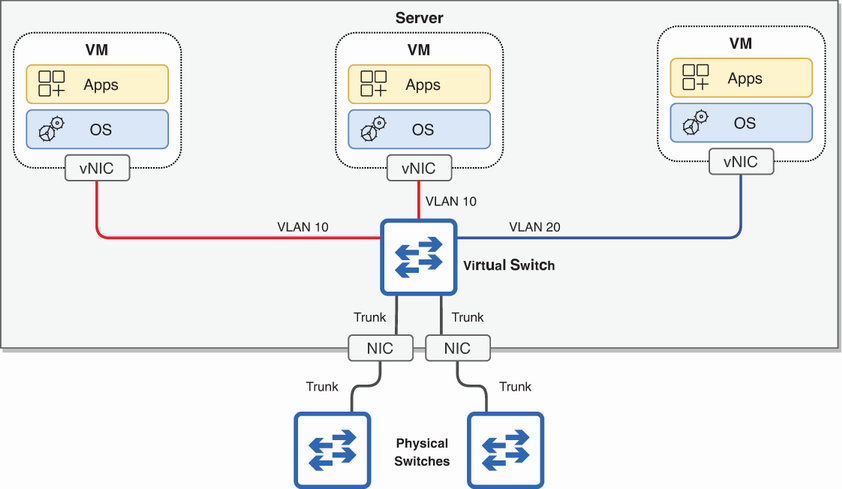
Use the topology figure to trace VM traffic through vNICs, the virtual switch, physical NICs, and VLAN trunk links. section 17.1.1
