Vision Studio is a browser-based, low-code workspace for experimenting with Azure vision capabilities. It helps teams analyze images without writing CLI scripts and supports custom classifier training when standard image analysis is not specific enough. section 7.3.1 section 7.3.2
A typical workflow looks like this:
- Open a Computer Vision resource in the Azure Portal and choose Go to Vision Studio. section 7.3.1
- Select Image Analysis, upload an image or paste a public URL, and review tags, descriptions, and confidence scores. section 7.3.1
- For specialized categories, create a Custom Vision project, label example images, choose a classification type and domain, then train the model. section 7.3.2
- Test new images through the resulting prediction endpoint, or download raw JSON from image analysis. section 7.3.1 section 7.3.2
Banning Books cover catalog
A catalog team can analyze cover images for automatic tags and descriptions, then train labels such as RetroFuturismCover or CircuitBoardCover to power visual browsing and recommendations. section 7.3.1 section 7.3.2
Figure 7.1 Use the Vision Studio templates to analyze images.
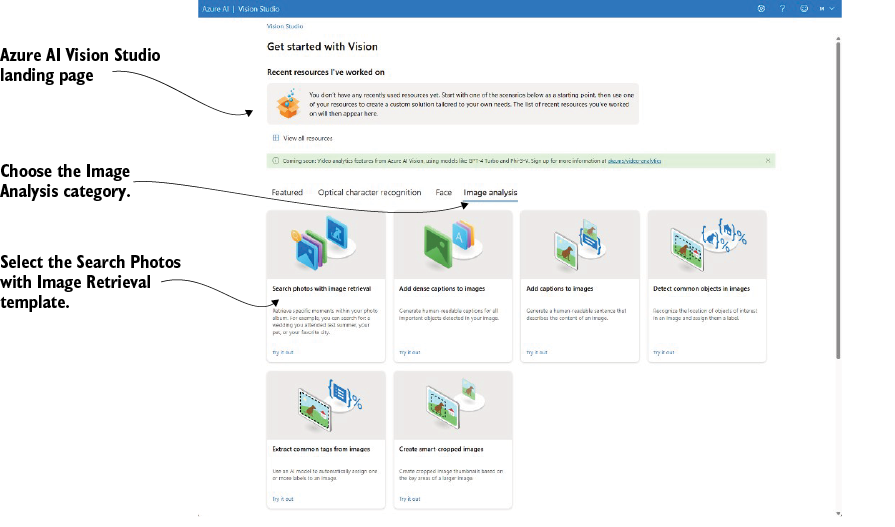
Use the Vision Studio figure to see the template-driven path for analyzing images. section 7.3.1
