A visual aid is an image, slide, diagram, screenshot, flowchart, or code snippet that makes technical information easier to understand, follow, and remember. It can break complex material into manageable parts, show system structure or flow, and keep an audience engaged. section 5.2.2 section 3.3.2
Use visual aids deliberately:
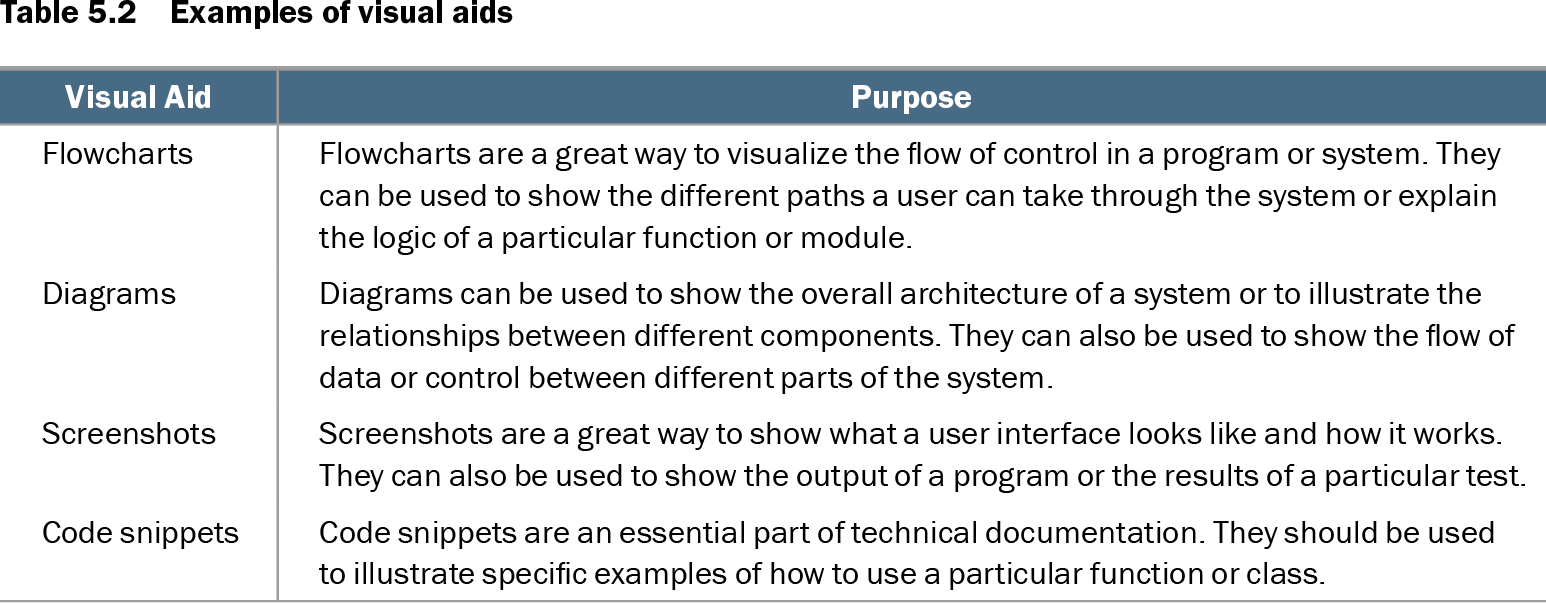
- Choose a flowchart to show control flow, a diagram to show architecture or relationships, a screenshot to show an interface or result, and a code snippet to illustrate usage. section 5.2.2
- Keep slides simple and focused: use an agenda, a few key points, clear headings, concise language, and a summary with next steps. section 3.3.2
- Use readable fonts, relevant high-quality images, consistent color, and layouts that make code or debugging output easy to follow. section 3.3.2
- Add callouts such as boxes or highlights to direct attention to important screen areas, while checking visuals regularly because development tools change. section 5.2.2
Documenting a Docker task
A step-by-step guide for pulling a Docker image can pair numbered actions with screenshots or diagrams. Separate commands such as docker –version, docker search <image_name>, docker pull <image_name>, and docker images in a distinct font so developers can identify, copy, and execute them accurately. section 5.3.2
Table 5.2 Examples of visual aids (view table figure)
| Visual Aid |
Purpose |
|---|---|
| Flowcharts |
Flowcharts are a great way to visualize the flow of control in a program or system. They can be used to show the different paths a user can take through the system or explain the logic of a particular function or module. |
| Diagrams |
Diagrams can be used to show the overall architecture of a system or to illustrate the relationships between different components. They can also be used to show the flow of data or control between different parts of the system. |
| Screenshots |
Screenshots are a great way to show what a user interface looks like and how it works. They can also be used to show the output of a program or the results of a particular test. |
| Code snippets |
Code snippets are an essential part of technical documentation. They should be used to illustrate specific examples of how to use a particular function or class. |
Compare flowcharts, diagrams, screenshots, and code snippets by the kind of structure, interface, result, or usage example each communicates. section 5.2.2