Voice input is information conveyed to a computer through human speech instead of typed text. A microphone and recording software capture the speech as audio that Python can process. section 7.0 section 7.1
Voice input makes practical data work more flexible. Instead of returning to a desk to type a database question, you can speak it while examining data, transcribe it, convert it to SQL, and present the results. section 7.3
A voice-enabled workflow can use speech in several ways:
- Record speech and transcribe the audio into text. section 7.0 section 7.1
- Use transcribed speech as the input to a natural-language database query interface. section 7.3
- Translate spoken input into another language and generate spoken output. section 7.4.1
A spoken database question
While pacing through the office, speak a question about tabular data. The system transcribes the recording, translates the request into a formal SQL query, executes it, and presents the result without requiring the question to be typed. section 7.3
Figure 7.2 Our translator tool records spoken input in a first language, transcribes input to text, trans- lates that text into a second language, and finally generates spoken output.
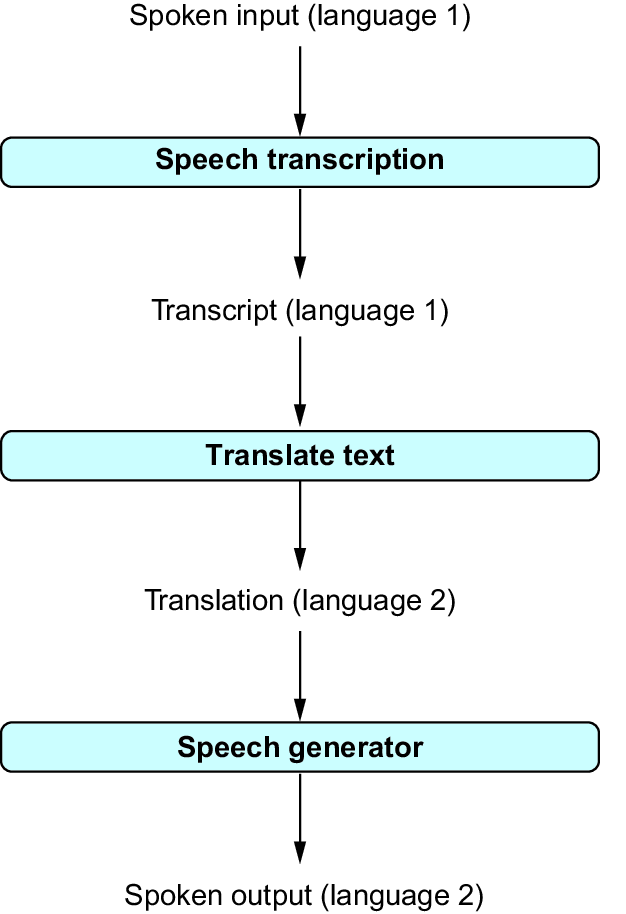
Follow the pipeline from recorded speech in one language through transcription and translation to generated speech in another. section 7.4.1
To try voice input in Python, use a microphone, sounddevice, and scipy to record audio. Add requests for API calls, and use playsound when generated speech must play on the computer; macOS may also require PyObjC. section 7.1
