liveBook · Manning

WAI-ARIA

As explained in Everyday Data Visualization

A W3C standard defining roles, states, properties, and attributes that improve the accessibility of dynamic web content.

WAI-ARIA is a W3C standard for making dynamic web content more accessible. For data visualizations, it supplies screen-reader-friendly labels for elements that ordinary image descriptions cannot fully cover. section 7.3.4

Use ARIA labels to make chart elements easier to navigate:

  • Use aria-label when the accessible name is not visibly displayed. section 7.3.4
  • Use aria-labeledBy to reuse visible text from another object through its id attribute. section 7.3.4
  • Keep labels brief—about three words—and give each bar or chart element its own name. section 7.3.4
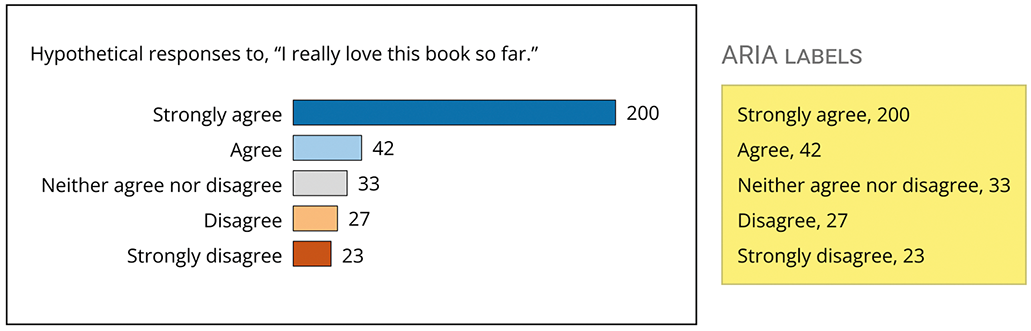
Figure 7.13 Using the graph from the previous two figures, this is what ARIA labels could look like for those bars. Each bar would have its own corresponding label, all of which are shown together in the yellow box to the right.
07-13

The figure shows how individual bars in a graph can receive corresponding ARIA labels, making the visualization readable through a screen reader. section 7.3.4


How Everyday Data Visualization covers it

How deep it goes
Explains two accessible-name attributes and bar-level labels, but stops short of broader ARIA internals.
Examples
Uses bar graphs and short labels assigned individually to their bars.
What it assumes
Assumes screen-reader and HTML-attribute context while offering a skip point for non-coders.
What you can do after
Apply it via aria-label and aria-labeledBy to give chart elements concise screen-reader names.
How it connects
Connects screen readers, accessible names, alt text, data visualizations, and W3C.

Also explained in

Compare how 3 books explain WAI-ARIA →

Related concepts

This explainer was generated by Manning's knowledge graph from the text of Everyday Data Visualization. The section links point to the parts of the book it draws on.
