liveBook · Manning

Wall

As explained in Learn Go with Pocket-Sized Projects

A wall is a maze boundary or obstacle that prevents movement through an adjacent position.

A wall is a maze grid element that blocks movement through an adjacent position. Mazes distinguish walls from paths, entrances, and treasures. section 9.1

Represent walls concretely when generating or solving an image-based maze:

  • Encode each wall as a grid position that is not traversable. section 9.1
  • Render walls as black pixels in an RGBA PNG image. section 9.1.2
  • Store the wall color in a palette and compare image pixels against it during exploration. section 9.3.1

Wall detection

A solver can inspect each pixel and classify it as a wall when its RGBA value equals the palette's wall color. section 9.3.1

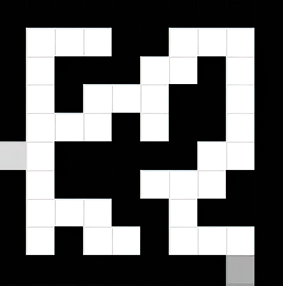
Figure 9.1 Example of a small maze with a treasure (exit) on the edge
A black and white maze

    Description automatically generated

View a small maze showing walls as the boundary structure around paths, including an entrance and treasure. section 9.1

How Learn Go with Pocket-Sized Projects covers it

How deep it goes
Defines walls, assigns them a color, and shows pixel classification, but stops short of traversal logic.
Examples
Uses black wall cells in maze diagrams and black RGBA pixels in generated PNG images.
What it assumes
Assumes familiarity with grid mazes and image pixels while teaching wall representation through colors.
What you can do after
Apply it via pixel-color comparison to distinguish blocked positions from traversable paths.
How it connects
Connects walls with mazes, paths, entrances, treasures, grids, pixels, RGBA colors, and image processing.

This explainer was generated by Manning's knowledge graph from the text of Learn Go with Pocket-Sized Projects. The section links point to the parts of the book it draws on.