Infrastructure-as-code tools need a representation of what they manage, not just the desired configuration. Tool state is infrastructure state stored by an IaC tool; it tracks managed resources and helps detect drift between actual resources and configuration. Terraform commonly stores this representation in terraform.tfstate, although some tools provide no state file. section 4.2.2
Use tool state as an integration boundary, while accounting for its limits:
- Expose dependency metadata through state when module outputs become difficult to maintain or when low-level attributes must be shared. section 4.2.2
- Prefer a configuration manager or key-value store when multiple tools and providers need a maintained, tool-independent metadata interface. section 4.2.2
- Use an infrastructure provider API when detailed information or out-of-band changes may not appear in a state file. section 4.2.2
- Treat state as different from actual infrastructure state; protect upgrades and migrations from mismatches, drift, and excessive blast radius. section 13.2.3 section 13.3.1
Blue-green state for a breaking upgrade
For a tool upgrade from version 3.0 to 4.0, pin tool and module versions, update the modules, and copy the existing configuration into a new folder. The new folder creates separate state for new “green” resources while the old “blue” resources remain isolated. Create and validate low-level resources first, then proceed upward and cut over when ready. Fewer resources in each state reduce recovery time and potential impact. section 13.2.3 section 13.5
Migrating to a new tool
Create a separate folder, branch, or repository for the new DSL. Write and test low-level configuration, import existing resources into the new tool’s state, and use dry runs to find mismatched defaults. Correct drift, repeat the process for higher-level resources, and remove the old tool’s configuration only after migration succeeds. section 13.3.1
Figure 13.9 A tool state captures the infrastructure state for the tool to make comparisons and can exist in separate locations for the tool to use.
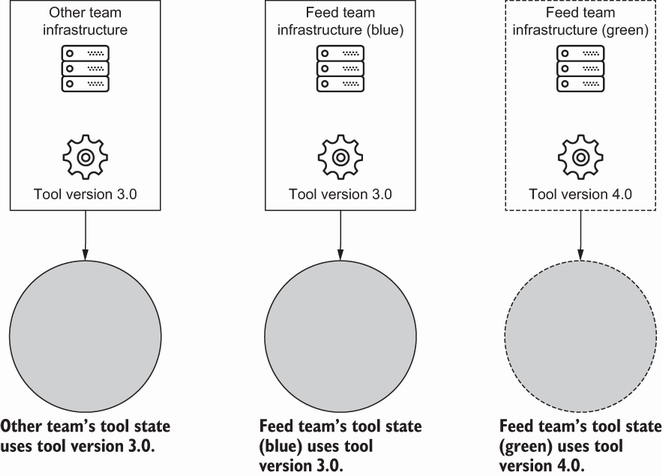
Shows how separate state locations let tools compare infrastructure independently and isolate changes between resource sets. section 13.2.3
