An interactive data science environment is a remote workspace inside a deep learning system. It lets data scientists and engineers work with production data and models without downloading customer data or models to local machines, where compliance and security requirements could be violated. section 1.2.2
A typical environment supports three operational tasks:
- Explore customer data with convenient access while enforcing compliance, preventing data leaks, and rejecting unauthorized access. section 1.2.2
- Prototype proof-of-concept models using tools available within the deep learning system. section 1.2.2
- Troubleshoot system activity by debugging model behavior, examining failed pipeline artifacts, and inspecting intermediate datasets or configurations. section 1.2.2
The environment fits alongside an API, dataset manager, model trainer, model serving, metadata and artifacts store, and workflow orchestration. These components are assumed to be networked microservices that can securely support multiple roles. section 1.2.1 section 1.2.2
Common implementation choices
Organizations commonly create a trusted environment with open-source Jupyter Notebooks or use a cloud JupyterLab-based offering such as Amazon SageMaker Studio. The choice preserves interactive access while keeping work inside the system boundary. section 1.2.2
Figure 1.3 An overview of a typical deep learning system that includes basic components to support a deep learning development cycle. This reference architecture can be used as a starting point and further tailored. In later chapters, we discuss each component in detail and explain how it fits into this big picture.
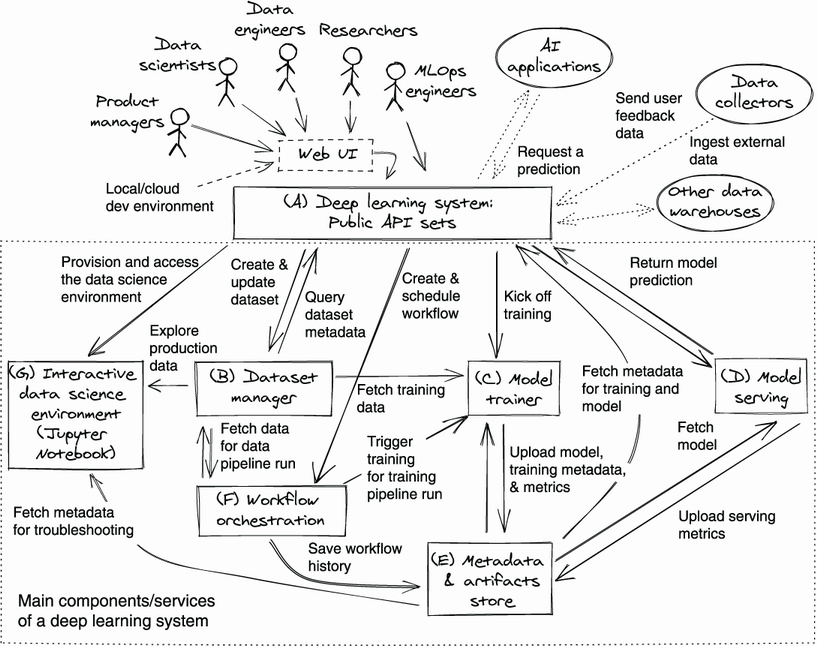
Use the reference architecture to locate the interactive environment among the services that support the deep learning development cycle. section 1.2.1
