Wasmtime is a WebAssembly runtime: the server-side host that executes guest modules and mediates their access to system resources. A custom host can place input in a module’s linear memory, invoke an exported function, and read the resulting data back. section 2.2
A typical Wasmtime interaction follows this sequence:
- The host injects input into the guest module’s linear memory. section 2.2
- The host invokes an exported guest function such as greet. section 2.2
- The guest allocates space conceptually within linear memory, writes the updated result, and returns control. section 2.2
- The host reads the completed result from linear memory. section 2.2
Python host setup
Create a Python host directory with main.py and requirements.txt, add wasmtime==30.0.0, then install it with python -m pip install -r requirements.txt. A virtual environment can isolate this host’s dependencies. section 3.3.1
Running a WASI 0.2 component
Build a component with cargo component build --release, inspect its interfaces with wasm-tools component wit, install the Wasmtime CLI, and run the resulting file with wasmtime <path-to>/hello_world_wasi02.wasm. Modules exporting wasi:cli/run can run without a custom host. section 4.2.1
Figure 2.3 Illustration of interactions between our “Hello, World” guest and its custom host
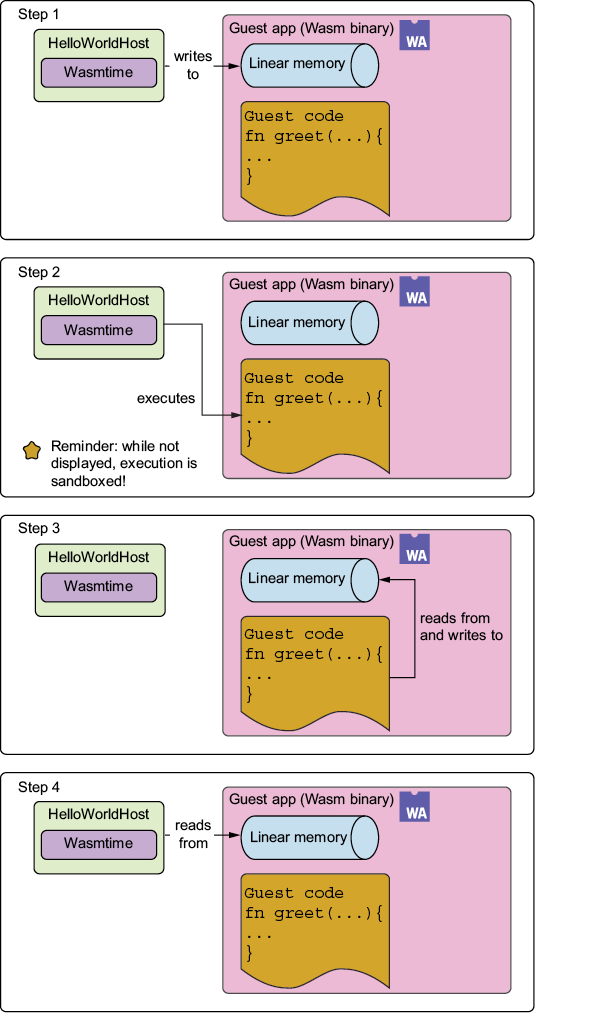
Use the guest-host interaction diagram to trace input transfer, guest execution, and result retrieval through linear memory. section 2.2
