Web Content Accessibility Guidelines (WCAG, pronounced “wuh-KAG”) are W3C guidelines for making web experiences accessible to as many people as possible. They address physical and cognitive disabilities as well as constrained ways of accessing content, including screen readers and mobile devices. section 4.4.2
WCAG 2.1 organizes accessibility around four principles: content must be perceivable, operable, understandable, and robust. Those principles break into 12 guidelines and 61 success criteria, with conformance levels A, AA, and AAA. Level A is the baseline; AA extends access further; AAA is stringent enough that it is not generally recommended as a whole-site requirement. section 4.4.2
Use WCAG as a practical design check, not a color-filter guessing game:
- Do not depend on color alone. Choose distinguishable colors with sufficiently different lightness, and keep palettes manageable for people with color blindness. section 4.4.1
- Provide an accessible alternative when a required palette fails color guidance, such as a user-controlled toggle to a compliant palette. section 4.4.2
- Make interactions work without a mouse or touch input: keyboard-only users must be able to operate them. section 7.4
- Let users pause or rewind automatic movement, avoid flashing or strobing effects, and make animations easy to disable. section 7.4
- Give interactive targets enough room to hit; the cited target-size criterion uses 44 px. section 7.4
Contrast can come from a border
A blue bar on light gray can miss AA contrast at 1.93:1. Adding a dark-gray border changes the visible boundary: the border-to-background contrast reaches 8.7:1, exceeding the 3:1 AA threshold used for this example. section 4.4.2
Figure 4.33 The top row shows a classic traffic light palette applied to a heatmap and what it looks like to someone with deuteranomaly (center) and deuteranopia (right). The bottom row shows a more colorblind-friendly palette of orange, gray, and blue instead of red, yellow, and green, respectively, under the same simulations. Remember, deuteranomaly is the most common type of color blindness, where the peak absorption of the green cone shifts toward the red end of the spectrum making greens appear more red. Deuteranopia is when the green cone isn’t functional at all.
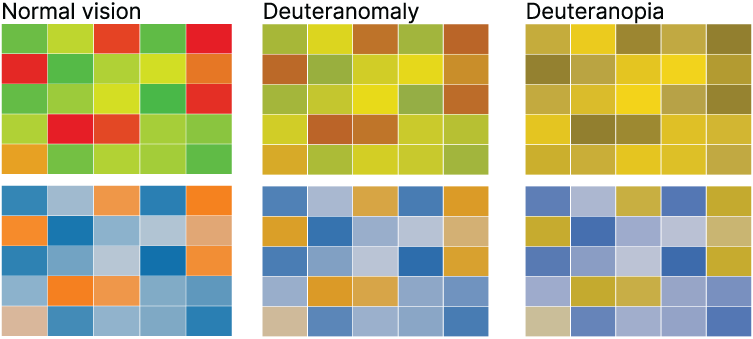
Compare a red–yellow–green heatmap with an orange–gray–blue alternative under deuteranomaly and deuteranopia simulations. The comparison makes clear why color choices need perceptible differences beyond familiar traffic-light meaning. section 4.4.1
Typography and interaction are accessibility concerns too. Inclusive type choices support people with deteriorating eyesight and other visual or neurological impairments, while operable interactions keep exploration from excluding people who cannot use a particular input method. section 5.5 section 7.4


