liveBook · Manning

Web Management Service

As explained in Building Web APIs with ASP.NET Core

A Windows service for IIS that enables remote administration and deployment operations for web applications.

The Web Management Service enables remote administration of IIS and supports Web Deploy publishing and deployment. Configure it after creating the web application site. section 12.3.5

Configure the service in IIS Manager:

  • Select the server root and open the Management Service panel. section 12.3.5
  • Enable Remote Connections. section 12.3.5
  • Click Start to run the service. section 12.3.5
  • Change the startup mode through Control Panel > Administrative Tools > Services if Web Deploy must work after every VM reboot. section 12.3.5
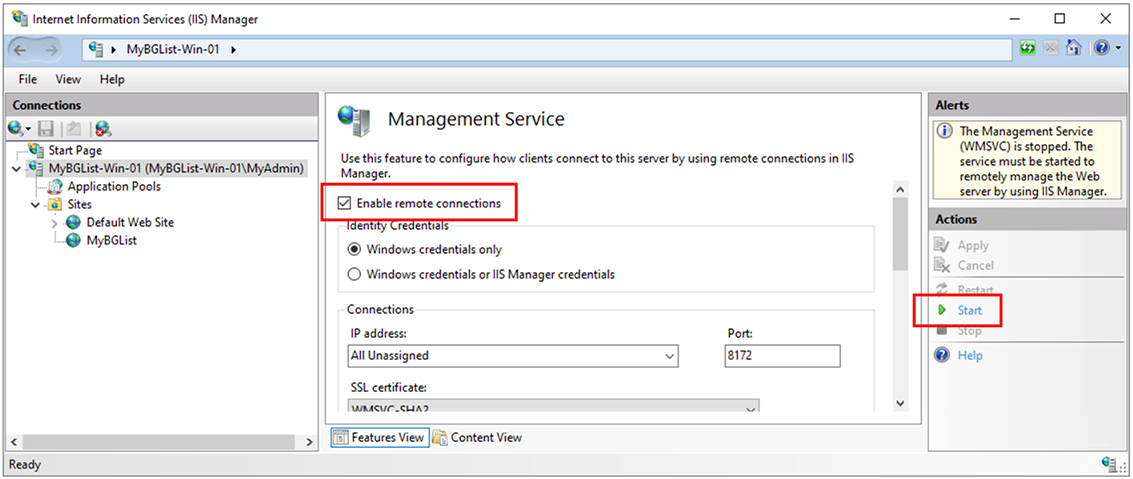
Figure 12.18 The IIS Manager’s Management Service window
12-18

Use the Management Service window to locate the remote-connection and startup controls. section 12.3.5

How Building Web APIs with ASP.NET Core covers it

How deep it goes
Explains configuration steps and manual startup behavior, but does not descend into service internals.
Examples
Uses IIS Manager’s Management Service window to enable remote connections and start the service.
What it assumes
Assumes IIS Manager and a configured IIS website, while locating the service controls through the server root.
What you can do after
Operate/configure it by enabling remote connections, starting the service, and selecting an appropriate startup mode.
How it connects
Connects IIS, IIS Manager, Web Deploy, remote connections, and Windows service startup configuration.

Related concepts

This explainer was generated by Manning's knowledge graph from the text of Building Web APIs with ASP.NET Core. The section links point to the parts of the book it draws on.