WebAuthenticator is a .NET MAUI API for browser-based OAuth authentication. Instead of collecting a username and password in the app, open the identity provider’s login page in a browser. After sign-in, the provider redirects back to the app with an authorization response. This keeps the password with the identity provider while the app receives the result needed to continue authentication. section 8.1.2
Figure 8.3 Step 1: Call the LoginAsync method of the OidcClient package. Step 2: The OidcClient package will call WebAuthenticator and display the login page on IdentityServer. Step 3: The user will log in to IdentityServer. Step 4: IdentityServer returns the result via WebAuthenticator. Step 5: The parsed result is returned to OidcClient. Step 6: OidcClient extracts the JWT from the result and returns it to the caller of the LoginAsync method.
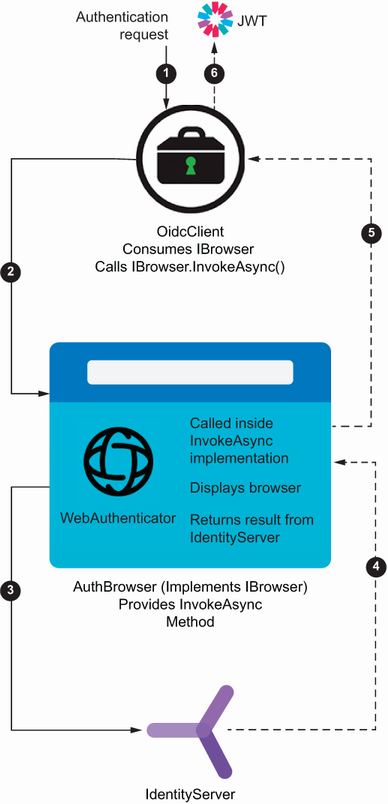
The authentication path has two distinct jobs: WebAuthenticator opens the identity-provider login page and receives its callback; OidcClient parses that response and extracts the token returned to the calling service. section 8.1.2
A browser flow needs a redirect URI. For a web app, that URI commonly returns to the website. For a mobile or desktop app, use a custom URL scheme associated with the app by the operating system, such as auth.com.mildredsurf.stocktake://callback. When the identity provider redirects to that address, the OS routes the callback to the installed app. section 8.1.2
Set up the callback before invoking authentication:
- Choose a redirect URI and use the same value in the identity-provider client configuration and application constants. section 8.1.2
- On Android, add an activity derived from WebAuthenticatorCallbackActivity and an intent filter matching the callback scheme and host. section 8.1.2
- On iOS and macOS, register the custom scheme in Info.plist. section 8.1.2
- On Windows, register the scheme as a windows.protocol extension in Package.appxmanifest. section 8.1.2
Using WebAuthenticator through OidcClient
Implement IdentityModel.OidcClient.Browser.IBrowser with an InvokeAsync method. Call WebAuthenticator.AuthenticateAsync with OidcClient’s StartUrl and the app redirect URI. Convert the resulting properties, including the returned code, into a BrowserResult. Configure OidcClient with that browser implementation, authority, client ID, scope, and redirect URI; then call LoginAsync. OidcClient handles parsing the OIDC response and returns the login result to the authentication service. section 8.1.2
WebAuthenticator handles opening the browser session and returning the callback response; it does not replace OIDC response processing in this arrangement. Pair it with an OIDC client when the identity provider returns an OIDC response that must be parsed for tokens. Take care with the interface name: .NET MAUI also defines an unrelated IBrowser interface, so use the fully qualified IdentityModel.OidcClient.Browser.IBrowser name when implementing the OidcClient browser contract. section 8.1.2
Keep browser authentication behind an authentication-service interface so UI code depends on the service contract rather than on the login mechanism. This fits dependency injection: register dependencies through the .NET generic host’s services collection and supply them to classes through constructors. section 8.5
Use WebAuthenticator when OAuth authentication should occur at an OIDC-compliant identity provider’s login page and the completed browser flow must return control to a .NET MAUI app. Register the custom scheme on every target platform, keep the redirect URI consistent, and delegate OIDC token parsing to a client such as OidcClient. section 8.1.2 section 8.5
