A website is an organized online presence whose pages, resources, navigation, and design work together around a clear purpose. Building one successfully involves planning, choosing tools, creating content, refining presentation, and maintaining the finished site. section 1.6 section 1.6.2
Choose the website’s primary purpose before deciding its structure and content:
- Sell products through an e-commerce site. section 3.2.1
- Publish ongoing posts through a blog, or combine posts with stable pages in a hybrid site. section 3.2.1
- Deliver news, information, education, social interaction, or question-and-answer discussions. section 3.2.1
Begin with a narrowly focused topic and a defined audience. A specific subject reduces competition and makes the site easier to keep coherent; an unfocused collection of features can produce jarring transitions, inefficient navigation, and inconsistent design. section 1.6.2
A practical WordPress website workflow moves from preparation to refinement:
- Select the WordPress version and hosting service, then consider access, security, backups, and whether to hide the site before launch. section 2.0
- Plan the site’s purpose, audience, topic, structure, and design before adding features. section 1.6 section 1.6.2
- Create and organize pages, refine navigation and presentation, and check that the finished site serves its audience. section 1.6 section 10.0
Focused site with a commercial goal
Instead of making a general fishing website, create a site about fly fishing on the Oconaluftee River. Add focused information or posts first; if selling products, use an e-commerce plugin such as WooCommerce and keep sales secondary to useful, polished content. section 1.6.2 section 10.0
Figure 1.4 An overview of the process of creating a new WordPress website (Diagram courtesy of Custom GPT “Diagrams: Show me”)
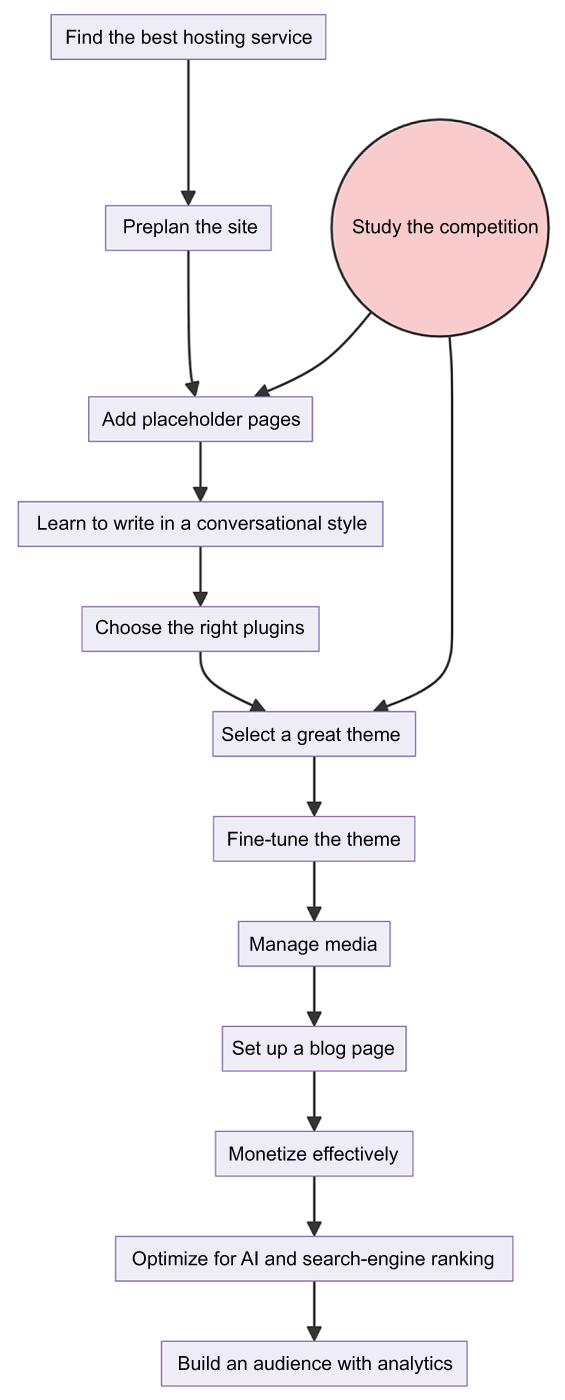
Use the process diagram to see how the major WordPress website-building tasks fit together from initial planning through completion. section 1.6

