Use an Elasticsearch wildcard query when a search term contains unknown characters, such as movie titles beginning with “god” or words resembling “godfather.” It is a term-level query: matching is binary, and the value is not analyzed at query time. section 9.7 section 9.10
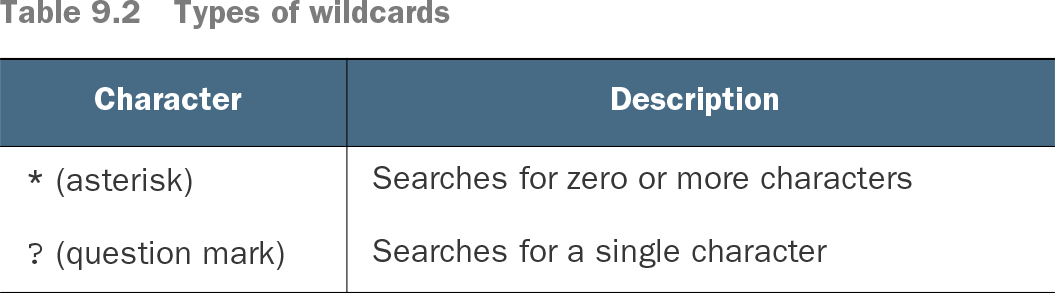
Table 9.2 Types of wildcards (view table figure)
Use * for zero or more characters and ? for exactly one character. section 9.7
Find titles beginning with “god”
GET movies/_search { "query": { "wildcard": { "title": { "value": "god*" } } } } The god* pattern matches a word beginning with god, including titles such as The Godfather, The Godfather II, and City of God. A pattern such as g*d can match words containing any number of characters between g and d. section 9.7
Apply wildcard queries with these field and matching considerations:
- Use lowercase values on analyzed text fields when the index analyzer lowercased the original terms; wildcard queries do not analyze their input. section 9.7
- Query a keyword subfield such as title.original when matching the complete stored value; “The God*” differs from “God*” because keyword values preserve the indexed text. section 9.7
- Map fields as wildcard data types when the field is intended for wildcard and regular-expression searches; keyword-family fields can improve search performance when used appropriately. section 4.5.2