The CPU input plugin periodically collects processor-utilization data as Fluent Bit log events. It supports infrastructure monitoring in containers and on physical hosts, where CPU capacity and resource allocation affect service efficiency. section 3.2.1
A basic CPU collection setup specifies:
- name cpu to select the CPU input plugin. section 3.2.1
- interval_sec 5 to collect measurements every five seconds. section 3.2.1
- tag book_vm_cpu to identify the resulting events. section 3.2.1
- An output such as stdout can match the events for local inspection. section 3.2.1
Basic CPU collection
[INPUT] name cpu interval_sec 5 tag book_vm_cpu [OUTPUT] name stdout match * The collected values include p_cpu for total utilization, p_user for user-process utilization, and p_system for system-process utilization. section 3.2.1
Listing 3.1 Performing basic OS monitoring
[INPUT]
  name disk           #1
  interval_sec 5
  tag book_vm_disk

[INPUT]
  name cpu          #2
  interval_sec 5
  tag book_vm_cpu

[INPUT]
  name mem         #3
  interval_sec 5
  tag book_vm_memory

[INPUT]
  name netif          #4
  interval_sec 5
  #interface eth0     #5
  tag book_vm_network

[OUTPUT]
  name stdout
  match *        #6
View the complete basic OS-monitoring configuration alongside disk, memory, and network inputs. section 3.2.1
Figure 2.6 Injecting the appropriate file into a configuration depending on the deployment context
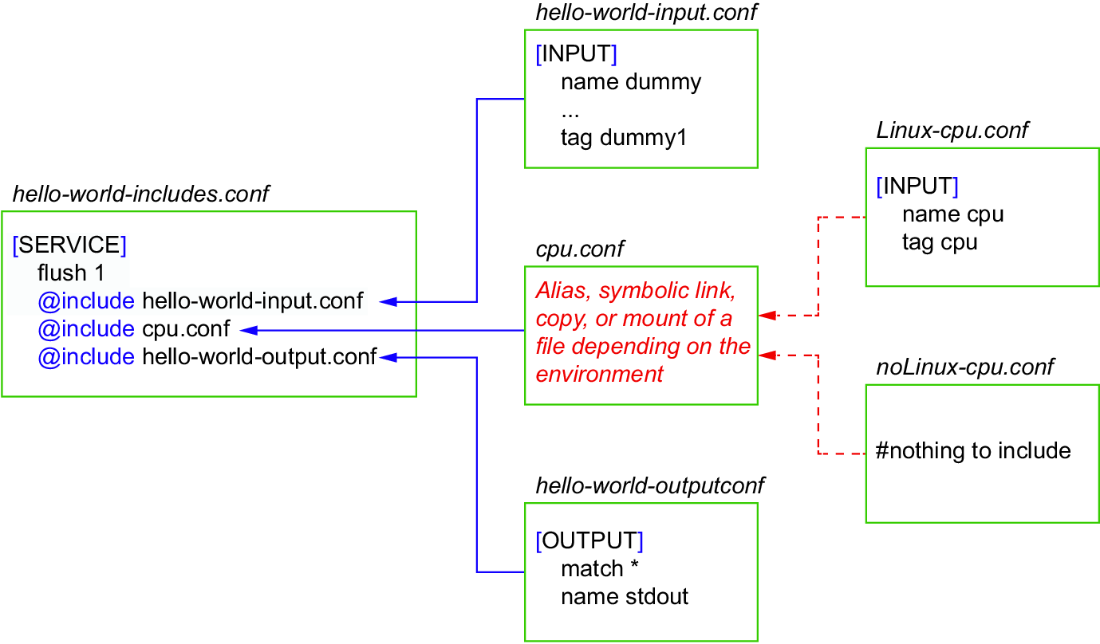
Use the deployment-context diagram to see how Linux and non-Linux CPU configuration variants can be selected without changing the core configuration. section 2.4.1
