liveBook · Manning

Windows authentication

As explained in Building Web APIs with ASP.NET Core

Windows authentication verifies a SQL Server connection using the identity of a Windows account.

Windows authentication verifies a SQL Server connection through the identity of a Windows account. In SSMS, choose it when connecting to a locally hosted SQL Server instance; leave the username and password fields blank. section 4.2.4

Configure the connection in SSMS as follows:

  • Set Server type to Database engine. section 4.2.4
  • Enter <MACHINENAME>\SQLEXPRESS or .\SQLEXPRESS for the local server. section 4.2.4
  • Select Windows authentication and keep Username and password empty. section 4.2.4
  • Click Connect to establish the SQL Server connection. section 4.2.4
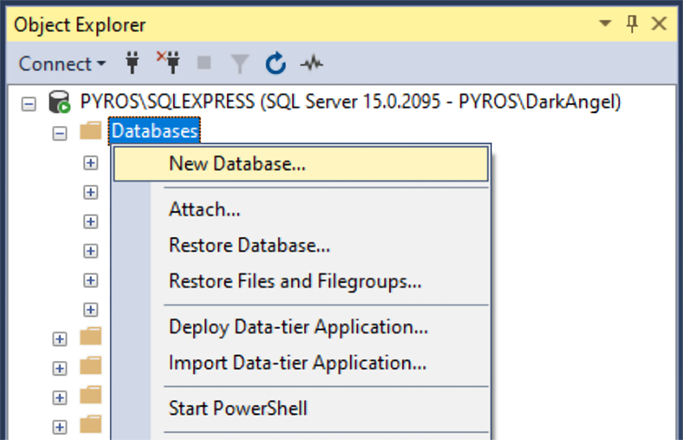
Figure 4.4 Adding a new SQL database in SSMS
04-04

Use the SSMS connection workflow to verify the selected authentication mode before creating the database. section 4.2.4

How Building Web APIs with ASP.NET Core covers it

How deep it goes
Explains connection settings and credential handling, but stops short of detailing Windows account authorization.
Examples
Uses SSMS, .\SQLEXPRESS, and the MyBGList database as concrete configuration examples.
What it assumes
Assumes SQL Server installation and SSMS access, while identifying Windows Authentication and Mixed Mode as installation choices.
What you can do after
Operate/configure an SSMS connection without entering username or password credentials.
How it connects
Connects Windows authentication with SQL Server authentication, SQL Server instances, databases, logins, and users.

Related concepts

This explainer was generated by Manning's knowledge graph from the text of Building Web APIs with ASP.NET Core. The section links point to the parts of the book it draws on.